201.13.2.5 Payment of Rights
Delivery Orders allows managing a real-time payment tracking of delivered content by storing the information regarding license payments into the Etere's Database once a Delivery Order has been created.
How to settle the payment of a delivered content?
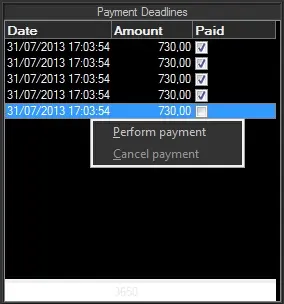
The "Payment Deadlines" section is located in the bottom left of the General tab, it listed all prepaid and post-paid payments related to the Delivery Order allowing to settle them as "paid" as well as "unpaid":
Bms_ott_payment
Payments can be settled by right-click and select the "perform payment" option so the accounting department is able to check this status and activate payment as and when it is confirmed to do so. Once it's settled, a payment can be revoked by selecting the "cancel payment" option.
More information on prepaid and post-paid payments:
Prepaid - Prepaid payment related to order lines paid in advance. This kind of payment is automatically inserted when an "prepaid" order line is saved.
Post-paid - Post-paid payment related to order lines paid when used. This kind of payment is not managed for Delivery Orders' content.
Note
Use the ToDo List to help you jot down all the pending tasks related to the current purchase order and send these notes as email notifications to other station departments (e.g. to the accounting department requesting them to settle the payment, or to a content provider to request a certain media, etc).
 Bms_ott_payment