91.6.1.6 Output Writer
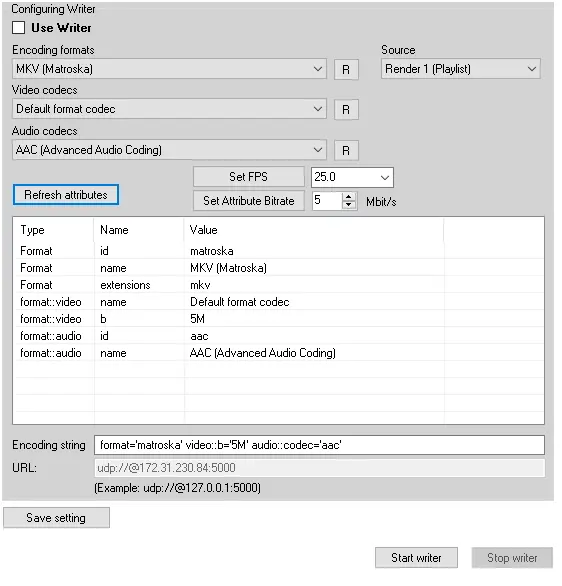
The purpose of this tab is to enable the user to perform a separate streaming to any desired destination
Use Writer - Check this option to start streaming with Output Writer
Encoding Formats - Select the encoding format
Source - Select the source from the available renders
Video codecs - Select the video codec
Audio codecs- Select the audio codec
Refresh attributes - Restore the default values for the selected encoding format
Set Attribute Bitrate - Set the bitrate
Set FPS - Set the wanted FPS the options will be resumed in the table with Type, Name and Value
Encoding string - Resumes the encoding string for the streaming with the possibility of edit it
URL - Destination url
Save setting - Save the desired settings
Start - Stop Writer - Start and stop the streaming
Note: with the configuration main/backup, the output writer section will stream only if the corresponding engine is currently active (Radio Playout streaming as main). After every main/clone switching, the corresponding main or backup engine of Radio Playout will re-start streaming after 6 seconds.
 output_writer