70.3.4.3 Etere Backup
The first method to backup your databases consists of using Etere Backup, just launch the application from any workstation and the following window will appear:
Backup Etere
•In the 'Select SQL database' section you will be able to select the Main database for which the backup will be performed, as well as the Backup database on which the backup copy will be restored.
•By clicking on the 'Set parameters' button will be allowed to set the shared path where the backup file will be stored, it is recommended to set the same path used in the copies path field in Etere HSM, so the database will be ready to be archived by Etere HSM.
Once you have finished to configure Etere Backup, you will be able to carry out the backup operation just by clicking on the 'Start Backup' button.
NB: For detailed information on how to use this module please refer to the Etere Backup chapter.
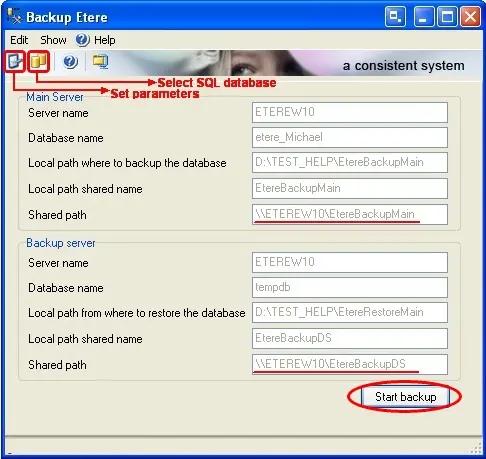 Backup_Etere