Resource Creation
65.1.2.3 Volumes
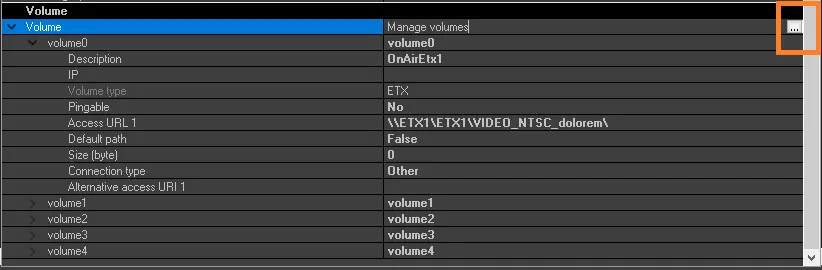
To start editing the volumes bound to the client/workstation/server linked to the Etere Ecosystem, browse to "Volume", the last section of the resource properties form, and click on [...] button.
4891_volume_cloud_button
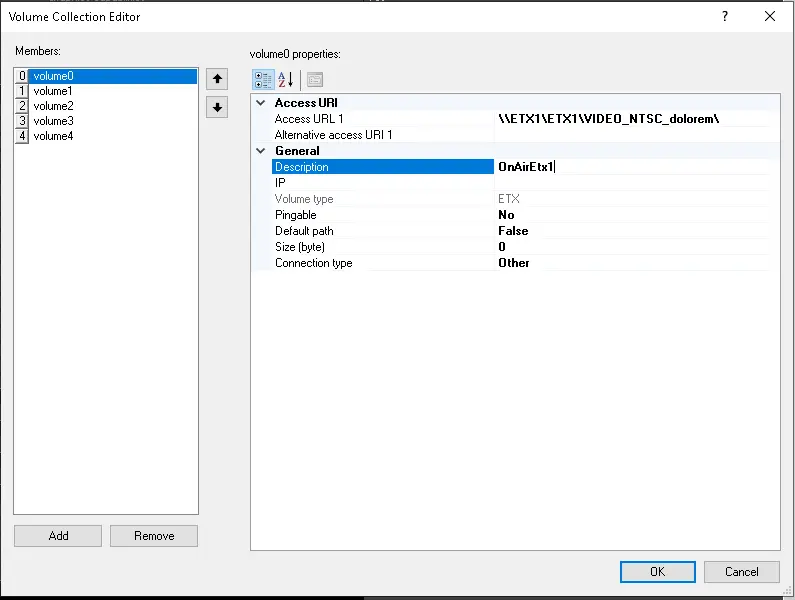
In the Volumes Field, you can configure the storage paths used by the device.
4892_volume_form
- Access URI
- Access URL 1: The main path that is used in Etere.
- Alternative access URI 1: Specify a secondary path to access the volume
- General: Insert here a brief description that allows the user to identify the volume's content.
- IP: Specify the device's IP address where the path is located.
- Volume type: This field is automatically filled with the value "ETX" and is not editable.
- Pingable: Define if the volume is pingable or not.
- Default path: Specify if it is the default path for the resource.
- Size (byte): Specify the allocated space on the disk assigned to the volume.
- Connection type: Define the type of connection used to access the path. Possible values are Other, SCSI or Fiber channel. The default type is "Other".
Once the volumes have been configured here, they will be automatically available as storage paths for meta devices in the Tools > Configure > Cloud-devices section.
Added volumes are also automatically included in the media folders. A warning message will be displayed to update the related media folders if an existing volume is modified.
Allowed volume paths:
- UNC (\\myfolder\)
- FTP (ftp://myfolder/)
- AVID (interplay://myfolder/)
- Local (d:\myfolder\)
Note: The usage of the root directory paths (e.g. D:\) is not allowed.
 4891_volume_cloud_button
 4892_volume_form