201.2.2.2 Payment of Rights
Etere BMS allows you to have a real-time payment tracking of licensing rights by storing the information regarding rights payments (concerning to purchased, sub-licensed, commissioned, produced programs, etc) once you have created a purchase order (Creating a new order) into Etere's Database.
How to settle the payment of a licensing right?
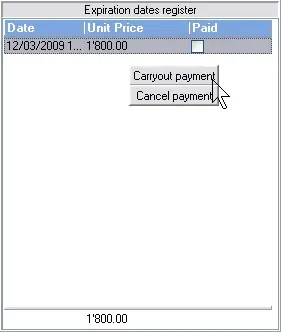
On the 'General' tab, there is a 'Expiration Data Register' box that listed all the payments programmed to be carried out and payments that already carried out based on two previously defined payment types:
•If an order line has its payment type set to 'at the use', it will appear in this list when it has been broadcasted.
•If its payment is set to 'prepaid', it will appear immediately when created.
The payment can be indicated by right-click on an item and select 'Carryout payment' and accounts department would be able to check this status and activate payment upon confirmation; if payment is done, the operator could de-active the payment by selecting the 'Cancel payment' option.
Traffic_bms_payment
Moreover, the ToDo List can be used to help track all the pending tasks related to the current purchase order and send notifications email to other station departments (e.g. to the accounting department requesting them to settle the payment, to the scheduling department to request a scheduling modification, etc).
 Traffic_bms_payment