59.3.3.6 Content Regenerator
The Content Regenerator section allows to create T-workflow actions specific for regenerating the thumbnails of EDL segments and assets themselves, this just by using the following functions (present in the toolbar):
Content_Regenerator
Add a new action: This button allows you to create a new action from an empty form.
Copy an existing action: Use this button to create a new action based on the selected one, and copy all its properties into a new action.
Open existing action: List all the action's parameters and allows to modify them.
Delete selected action: Removes the selected action completely.
Refresh: Update the list of actions located at the left of the window.
Note: In order to work, the asset for which the regeneration is launched must be linked to a proxy file stored in the selected source server.
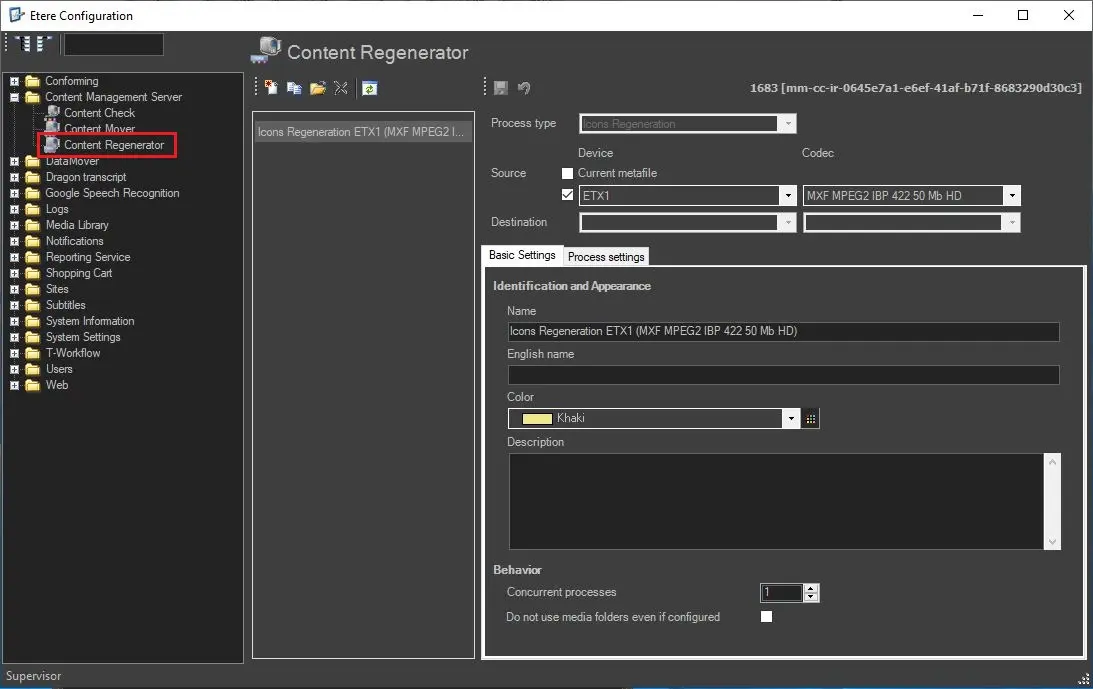
As shown in the figure above, on the left is located the actions column listing all existing actions, whereas in the right area is located the editing panel where every single action is managed using the following parameters:
Main Information
• Process Type: Choose from the drop-down list the type of action "Icons Regeneration".
• Source: Select the device where the file to be processed is located. The relevant devices will appear in the dropdown list (only those configured in Resource Editor).
You must also select the relevant codec from the dropdown list related to the file contained in the referred Source device.
• Destination: Not needed for the Icons Regeneration action.
Basic Settings
Once you have been compiled the fields above and have saved the action, two tabs will be enabled for entering relevant data regarding how the 'data movement' will be performed.
This section displays basic information about the current action; the action name is usually named with a descriptive string that self-explains its function (e.g., Icons regeneration on MTX3 for WMV).
Process Settings
This tab allows to set the executable to be used to perform the action.
Note: From Etere version 34.2.331.8031, this section is not available anymore. Since Etere Datamover is EOL and replaced by Media Manager Service, Datamover's Icons regeneration action has been replaced as well with the corresponding Media Manager Service's action. See chapter 93.2.1.10 MMS - Icons Regeneration for more information.
 Content_Regenerator