72.12 Statistics
What is Statistics?
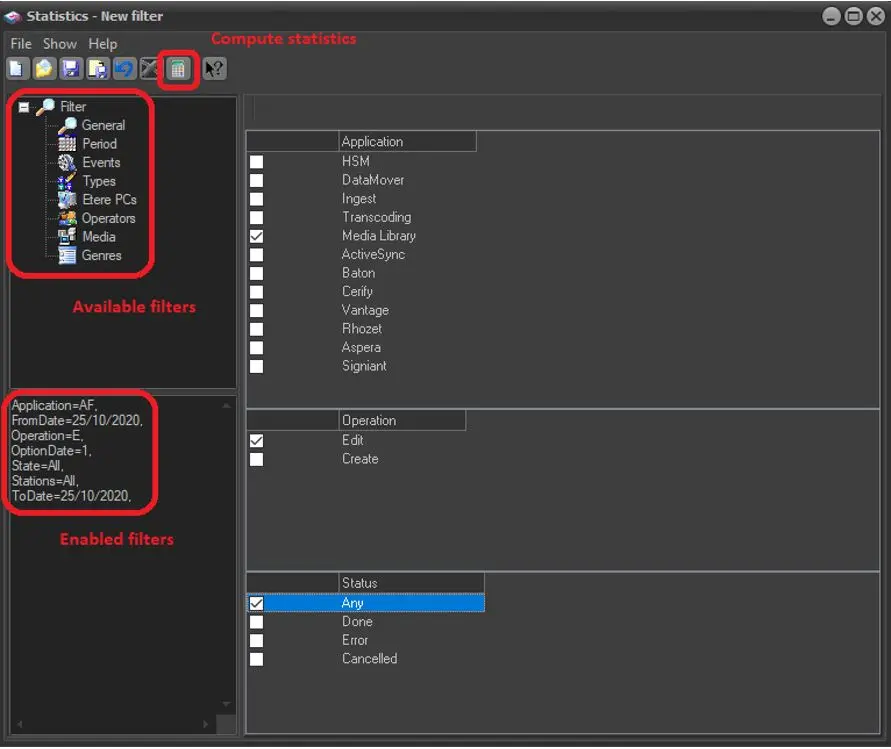
The Statistics module allows the retrieval of statistics concerning certain user-defined parameters (module, operation, date range, events, types, etc); this useful tool allows, for example, to generate a report displaying the daily//weekly/monthly volume of transfers performed by Etere Data Mover.
Using Statistics
To create a new statistics view, just click on the 'New' button on the toolbar and proceed as described below:
Statistics
General - Here, you MUST select the Etere application to which statistics are related, optionally specifying the exact operation and status (e.g. Media Library > Create > Any). Supported applications:
▪HSM
▪DataMover
▪Ingest
▪Transcoding
▪Media Library
▪ActiveSync
▪Baton
▪Cerify
▪Vantage
▪Rhozet
▪Aspera
▪Signiant
Period - Specify the station to which data is related as well as the period(s) from which data will be retrieved:
•Period: Indicate the period for which data will be computed.
•Previous period: Optionally, by enabling the "compare" option, it will be possible to set here a previous period (exactly as long as the first one) with which made a comparison.
Events - Indicate the assets to be analysed during the process. If none is selected, all will be included.
Types - Specify the types of assets to compute. If none is selected, all will be included.
Etere Pcs - Select the workstations that performed the operations you want to include in the statistics. If none is selected, all will be included.
Operators - As indicated for the workstations, you can select the operators to be analysed here. If none is selected, all will be included.
Media - List all cloud devices implemented in the system, allowing one to select the one(s) in which assets must be stored to be included in the statistics.
Genres - List all the genres configured in the system, allowing the selection of the one(s) to which assets must belong to be included in the statistics.
Once you have finished, click the [Calculate] button for a print preview according to the selected parameters.
 Statistics