Season Manager
9.3.2 New Season
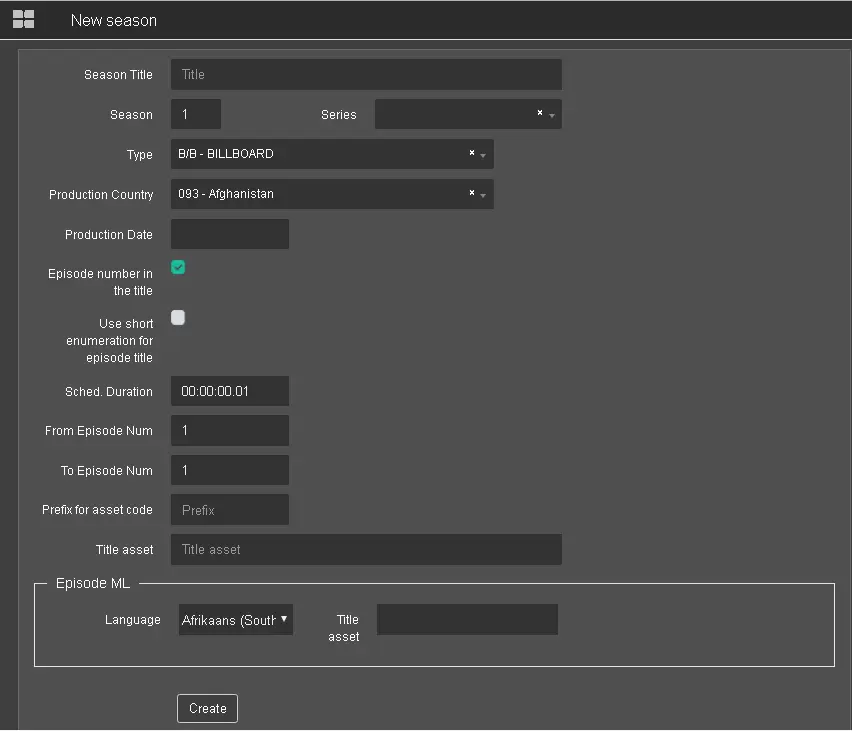
Click <New Season> in Season Manager to launch the dialogue box.
New_Season
To create a new season, the following parameters are required:
- Season Title: Give a title name to the new season;
- Season: Specify the season the new season episode belongs to;
- Type: Select one of the types from the drop-down list, e.g. commercial, movies, ETX graphic, News, etc. The types are defined in Etere Configuration > Settings > Types Editor > Types section;
- Production Country: Select the country from the list where the new season is created;
- Production Date: Select the production date of the new season from the calendar;
- Episode number in the title: It determines whether the title contains an episode number;
- Use short enumeration for episode title: Enable this option to allow the automatic creation of episode numbers in running order. This is True if the Title asset parameter in Episode ML is entered as EPISODE;
- Sched. Duration: Specify the expected scheduled duration of the new season. The duration format is 00:00:00:00. This duration would be applied to all episodes;
- From Episode Num: Indicate the starting number for the new season in the episode;
- To Episode Num: Indicate the ending number for the new season in the episode;
- Prefix for asset code: Specify a prefix to be assigned to the start of asset code;
- Title Asset: If using a prefix, indicate a sequential number in the season title;
- Episode ML
- Language: Select a language for the episode;
- Title asset: In this parameter, enter EPISODE to automate the episode number during creation;
Upon fulfilling all parameters, click the <Create> button to create the new season.
 New_Season