61.1.1 Document Insertion
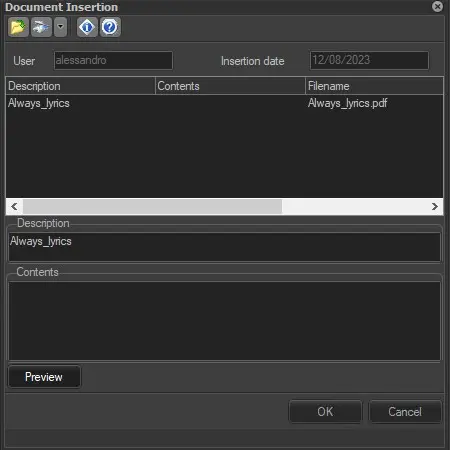
The "Document Insertion" window allows associating digital files to the virtual document through the following functions:
document_insertion_form
Open a new image from a file - Acquire a new document from the file; that is, browse and select the file to be associated as a virtual document.
Acquire a new document from the scanner - Acquire a new document from the scanner, that is, open the Etere digitizing tool for acquiring images from a scanner, allowing to associate the scanned file as a virtual document. The following scan formats are available:
JPEG - Scan one page and save it as a single virtual document. Multiple pages will be saved as separate virtual documents.
PDF - Scan multiple pages and save them as a single virtual document.
NB: If the Twin driver is not the only available driver for the scanner device, it's suggested that the vendor driver be chosen when available.
Moreover, the "Document Insertion" window also allows compiling the following information on the virtual document:
Description - The name of the inserted file or a brief description that can be inserted in the text field below the table.
Contents - A more detailed text on the added document that can be edited in the text field below the table.
Filename - The name of the file inserted.
File path - The path where the file is located.
File type - The type of the file inserted.
Insertion date - The date when the document was inserted. This field is automatically filled.
User - The user who inserted the document.
Preview - Clicking on this button allows a document preview in a different window if the file extension is supported.
 document_insertion_form