84.4.5.23 STANDARD > IMAGINE > BINARY
Import Scope
The Imagine Binary Import allows to import a Binary file (.LST, .LOG, etc.) containing the schedule of a certain date.
Importing secondary events
The "Imagine Binary" import allows importing records related to the following supported secondary events:
✓83H: (sKEYER:;Keyevents for a Partial Duration)
✓84H: (sTRANKEY; Transition Keyevents for the Entire Duration)
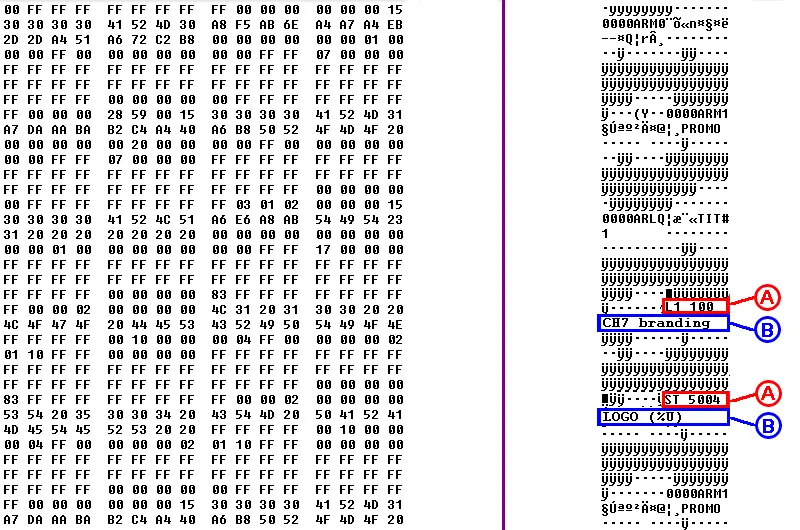
In order to do this it's required to specify the Logo or STMan event to be imported, just as explained below:
Import_louth_binary_01
TYPE - Logo
Field : A - ID
Description : Layer and number of Etere Logo
Format : Lxxx yyy
Example : L1 100
Position : 17
Length (chars) : 8
Mandatory : Yes
Field : B - TITLE
Description : Description of logo
Format : zzzzzzzz zzzzzzzz
Example : CH7 brand
Position : 25
Length (chars) : 16
Mandatory : No
TYPE - STMan
Field : A - ID
Description : STMan identifier and CTM number
Format : ST xxxxx
Example : ST 5004
Position : 17
Length (chars) : 8
Mandatory : Yes
Field : B - TITLE
Description : Parameters of CTM script
Format : zzzzzzzz zzzzzzzz
Example : LOGO(%U)
Position : 25
Length (chars) : 16
Mandatory : No
Importing parameters
Import_standard_louth_binary
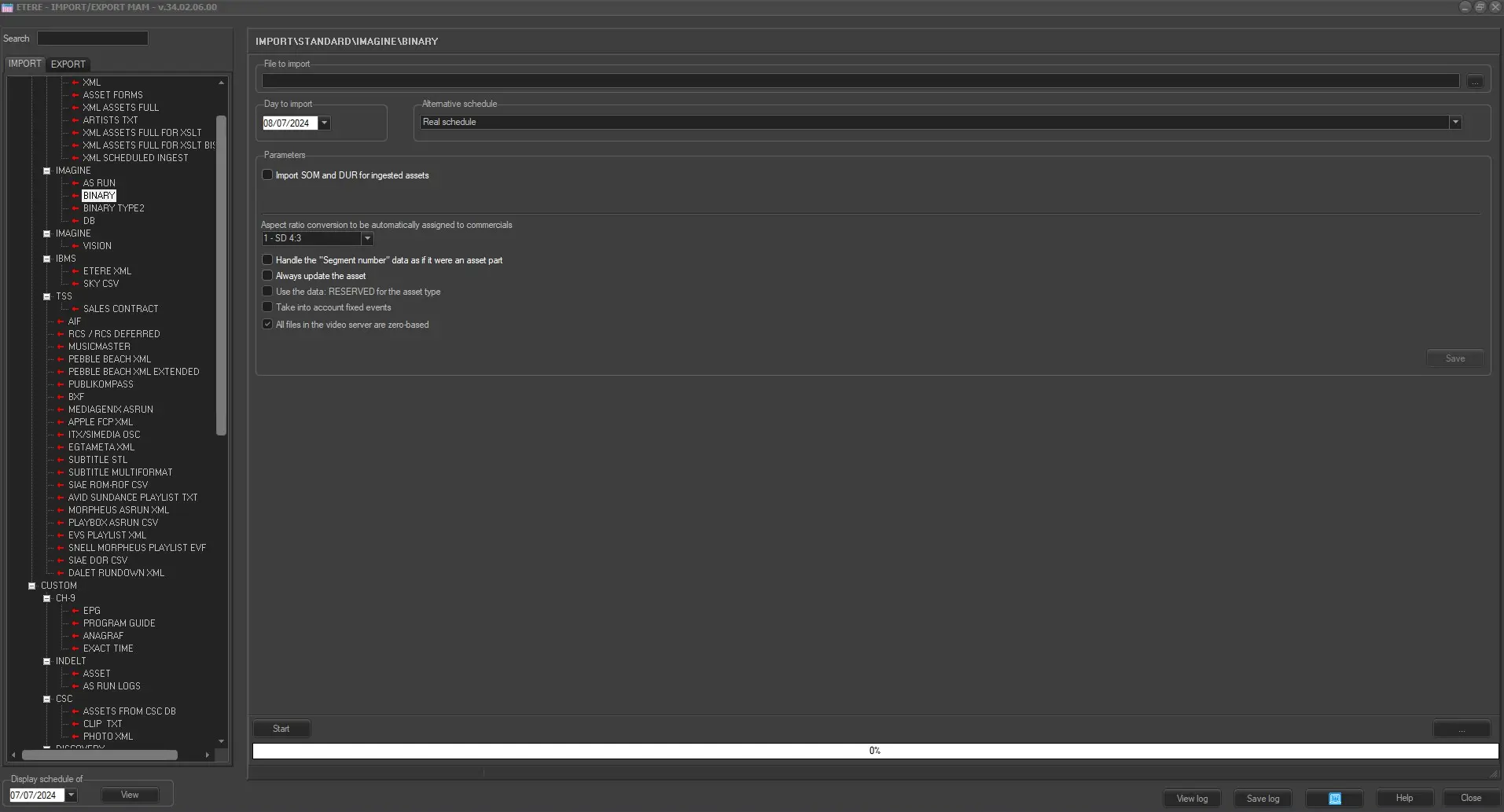
This import module requires the following parameters to be set in order to be correctly used:
Import tab
File to import - Browse and select the folder where files to be imported will be stored.
Day to import - Specify the exact date for which the import will be performed.
Alternative schedule - Indicate whether the import is related to a real or alternative schedule.
Import SOM and DUR for recorded assets - Choose to import asset properties (SOM and DUR) into the schedule in a situation where they are present and the file is recorded.
If the Segment Number is available in the file, the details (SOM and DUR) of the corresponding visible segments of the asset will be imported, assuming they exist and the asset has been recorded.
Aspect ratio conversion to be automatically assigned to commercials - Indicate the ARC to be set for imported commercial events.
Handle the “Segment number” data as if it were an asset part - When importing programs that divided into various segments, enable this option to import programs as part of an asset.
Always update the asset - Enable this option to update the asset form even they are exist in archive.
Use the data: RESERVED for asset type - New asset or asset with undefined asset type would be assigned with RESERVED=1 (the number ranged from 0-9). Enable this option to import assets with a defined type.
Take into account fixed events - Enable this option to import events scheduled as fixed events.
All files in the video server are zero-based - If enabled, asset scheduled beyond midnight would be imported as zero-based timecode.
Launch the import
Once the import has been configured, it can be started just by pressing the <Start> button, once the import has finished, it will be possible to display the schedule of the related day to verify and/or approve the import operation.
Sample file to import
The file to be imported using this method will have to the following structure in order to be correctly imported:
1120141106.lst
00 7F 7F 7F 7F 7F 7F 7F 7F 00 00 00 00 00 00 15
30 30 30 30 41 52 4D 30 28 75 2B 6E 24 27 24 6B
2D 2D 24 51 26 72 42 38 00 00 00 00 00 00 01 00
00 00 7F 00 00 00 00 00 00 00 7F 7F 07 00 00 00
7F 7F 7F 7F 7F 7F 7F 7F 7F 7F 7F 7F 7F 7F 7F 7F
7F 7F 7F 7F 7F 7F 7F 7F 7F 7F 7F 7F 7F 7F 7F 7F
7F 7F 7F 7F 00 00 00 00 00 7F 7F 7F 7F 7F 7F 7F
7F 00 00 00 28 59 00 15 30 30 30 30 41 52 4D 31
27 5A 2A 3A 32 44 24 40 26 38 50 52 4F 4D 4F 20
00 00 00 00 00 20 00 00 00 00 7F 00 00 00 00 00
00 00 7F 7F 07 00 00 00 7F 7F 7F 7F 7F 7F 7F 7F
7F 7F 7F 7F 7F 7F 7F 7F 7F 7F 7F 7F 7F 7F 7F 7F
7F 7F 7F 7F 7F 7F 7F 7F 7F 7F 7F 7F 00 00 00 00
00 7F 7F 7F 7F 7F 7F 7F 7F 03 01 02 00 00 00 15
30 30 30 30 41 52 4C 51 26 66 28 2B 54 49 54 23
31 20 20 20 20 20 20 20 00 00 00 00 00 00 30 00
00 00 01 00 00 00 00 00 00 00 7F 7F 17 00 00 00
7F 7F 7F 7F 7F 7F 7F 7F 7F 7F 7F 7F 7F 7F 7F 7F
7F 7F 7F 7F 7F 7F 7F 7F 7F 7F 7F 7F 7F 7F 7F 7F
7F 7F 7F 7F 00 00 00 00 03 7F 7F 7F 7F 7F 7F 7F
7F 00 00 00 00 00 02 00 4C 31 20 31 30 30 20 20
24 3D 35 78 3E 47 25 4D 3C 40 2E 69 20 30 4F 20
7F 7F 7F 7F 00 00 08 00 00 01 7F 00 00 00 00 48
01 00 7F 7F 00 00 00 00 7F 7F 7F 7F 7F 7F 7F 7F
7F 7F 7F 7F 7F 7F 7F 7F 7F 7F 7F 7F 7F 7F 7F 7F
7F 7F 7F 7F 7F 7F 7F 7F 7F 7F 7F 7F 00 00 00 00
03 7F 7F 7F 7F 7F 7F 7F 7F 00 00 00 28 59 11 00
4C 31 20 31 30 30 20 20 24 3D 35 78 3E 47 25 4D
3C 40 2E 69 20 30 4F 20 7F 7F 7F 7F 00 00 08 00
00 01 7F 00 00 00 00 48 01 00 7F 7F 00 00 00 00
7F 7F 7F 7F 7F 7F 7F 7F 7F 7F 7F 7F 7F 7F 7F 7F
7F 7F 7F 7F 7F 7F 7F 7F 7F 7F 7F 7F 7F 7F 7F 7F
7F 7F 7F 7F 00 00 00 00 03 7F 7F 7F 7F 7F 7F 7F
7F 00 00 00 28 59 21 00 4C 31 20 31 30 30 20 20
24 3D 35 78 3E 47 25 4D 3C 40 2E 69 20 30 4F 20
7F 7F 7F 7F 00 00 08 00 00 01 7F 00 00 00 00 48
...
 5230_Import_louth_binary_01
 IMPORT_IMAGINE_BINARY