Lines data
4.5.2.4 Options
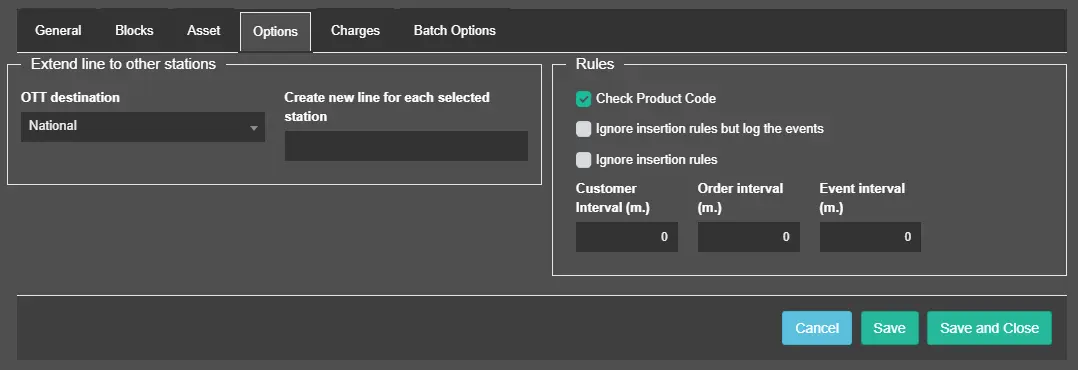
In the Options section, you can set the scheduling rules based on user requirements.
lines_options
Extend line to other stations:• OTT destination: Select the network across which the commercial is expected to be transmitted:- Main network: By selecting the main network, the commercial would be scheduled for transmission across all networks;
- Regional networks: The commercial would be scheduled to be transmitted exclusively across the selected regional network. Only one regional network can be selected.
Note: Regional networks can be defined in Etere Configuration > Settings > AD Insertion Management.
• Create a new line for each selected station: This function allows to automatically create a duplicate order line that you can allocate to a different station or link the same asset form to more stations. In the first case (create a new asset) you are due to schedule the parent form, you will also be asked to confirm if the commercial scheduling relates to all connected forms (and as such to be scheduled to air on all stations).
Rules:
Enable/disable the following rules:
• Check product code:Enable this parameter to avoid scheduling order lines across those segments which already contains a commercial with the same product category.
Note: In case of scheduling commercials across split networks, the system will check for category conflicts between commercials scheduled in the main network and those to be scheduled in the split network.
• Ignore insertion rules but log the events: If enabled, the scheduling process would ignore the insertion rules and log the events in the scheduling report;• Ignore insertion rules: ignore all insertion rules during scheduling.• Set the interval:
- Customer Interval:
Minimum gap that there must be between two event runs of the same customer. This parameter is used to avoid scheduling two event runs of the same customer too close within the schedule.
- Order interval:
Minimum gap that there must be between two event runs of the same order. This parameter is used to avoid scheduling two event runs of the same order too close within the schedule.
- Event interval:
Minimum gap that there must be between two runs of the same event. This parameter is used to avoid scheduling two runs of the same event too close within the schedule.
 lines_options