84.4.5.70 CUSTOM > MTV SIAE ROM-DETAILS CSV
Import Scope
The Import Custom MTV SIAE ROM-Details CSV import a CSV file containing the SIAE ROM details data of an Etere asset.
In the CSV format file:
•All data fields are separated by semicolon (;)
•Each row contains all details information of an Etere asset
•The asset code is defined by the file name
•The below details structure in the file would be imported into database:
❑Import the Title (column 5) into the "Title"
❑Import the Composer (column 7) into the "SCF-Composers"
❑Import the ISRC (column 19) into the "SCF-ISRC"
❑Import the labels (column 17) into the "SCF-Labels"
❑Import the MCPS (column 20) into the "SCF-MCPS"
❑Import the Performers (column 6) into the "SCF-Performer"
❑Import the PRS (column 16) into the "SCF-PRS"
❑Import Publishers (column 9) into the "SCF-Publishers"
During import process:
•The asset must exist in the system, else message would be highlighted in the Error tab.
•Using the “Update all the details of the asset, even if already present” parameter:
•When disabled, if the present asset has linked details, the asset would not be updated.
•When enabled, if the present asset has linked details, it would be updated according to the details in CSV file
•If the author does not exist in the system, it would be created.
•If the asset details exist in system, the import would compare the title and composer, and no update would be performed.
•If the asset details does not exist, it would be created with “SIAE” type and code=filename + “-“ + “nnn”, where “nnn” is retrieved from table ID_FILMATI.
e.g. if filename is “ETGA0924-002.csv, the detail code would be “ETGA0924-002-22006”
•If there are multiple assets having the same data, the asset can be linked several times to the same parent asset.
•If the Type of music generation is not indicated in the file, it would not be imported as value “33” (by default), the following rules would apply:
- If the data type is CLIP, it would be imported as value “22”.
- If the data type is not CLIP, it would be imported as value “11”.
The import would be aborted if the following conditions does not complied with:
•It is not a CSV file
•The parent asset exist in Etere system
•Each line has 27 characters (;)
•The data in “Time Used” column must be valid (e.g. 00:00:20)
•The data in “Use Type” must contains one of the value: Background, Featured, or Signature.
•The sum of individual details is less than or equal to the duration of the parent asset
•The parent asset has no already linked details, unless the option “Update all the details of the asset, even if already present” is enabled.
Import Parameters
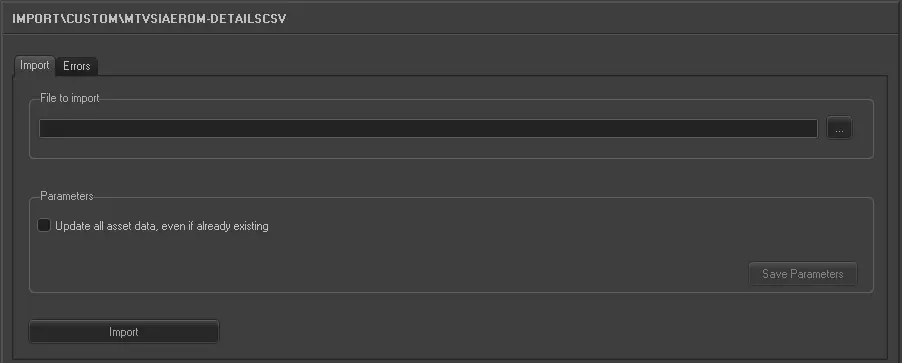
Import_custom_mtv_siae_rom-details_csv
File to import - Specify the name of the CSV file to import. You can use the browse button to locate the file in the drives.
Parameters - ❑Updates all the details of the asset, even if already present:
Enable this option to update assets with all the details information present in the CSV file, even assets details already present in database.
Launch the import
When all parameters are fulfilled, click the <Import> button to start the import process.
 5281_Import_custom_mtv_siae_rom-details_csv