Rundown Playout Panel
79.3.2.3 Playout Menu
The Playout menu includes all available playout functions.
Playout
Go on-air: Load the current Rundown and all configured channels with the first sequence of clip of the story.
NB: Exiting Nunzio while a rundown is on-air is disallowed, it's required first putting it off-air.
- Put off-air: Interrupts the current on-air Rundown.
NB: Exiting Nunzio requires putting all rundowns off-air, otherwise a warning message is displayed.
- Send on-air next story (F2): Start the Rundown counter and load the next story in the list.
- Send on-air previous story (Shift + F2) Load the previous story on-air.
- Load objects to playout: Reload every channel and CUE the available clips/objects in the story even if playing.
- Play on-air object to playout (F4) This function put on-air object to playout in Rundown.
- Play on-air video over to playout (F6) This function put on-air video to playout in Rundown.
- Play on-air graphic to playout (F8): This function put on-air ETXG graphic to playout in Rundown.
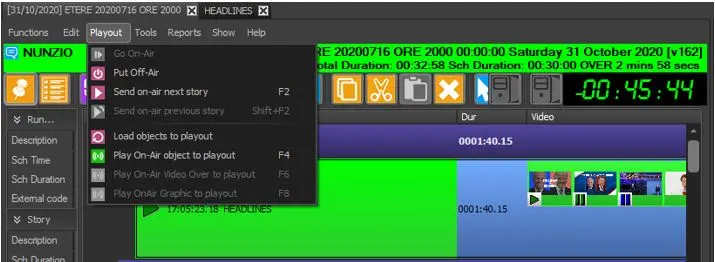 Playout