201.13.6.1 Available line functions
The "Delivery Orders" module provides the following function for managing order lines under the "Lines" tab:
TOOLBAR
Icon -
Function : New
Description : Creates a new order line into the current Delivery Order.
Icon -
Function : Save
Description : Saves all changes performed on the order line.
Icon -
Function : Undo
Description : Cancel the last change performed to the order line.
Icon -
Function : Delete
Description : Removes the selected line from the current Delivery Order.
Icon -
Function : Do.Ma.
Description : Opens the Etere Do.Ma. (Documents Management) module, useful for attaching either stored files or scanned documents to the current order.
Icon -
Function : Multichange data
Description : Provides a useful interface to quickly modify one or more properties across multiple order lines. See Multichange data.
CONTEXTUAL MENU
Function - Update
Description : Refreshes the list of order lines (description, runs, reruns, etc).
Function - Assign an asset *
Description : See chapter "Assigning assets".
Function - Open the linked program (single/season)
Description : Open the program assigned to the selected order line using either the "BMS_toolbar_05 Media Library" (for single programs) or the "BMS_toolbar_06 Season Manager" (for season programs).
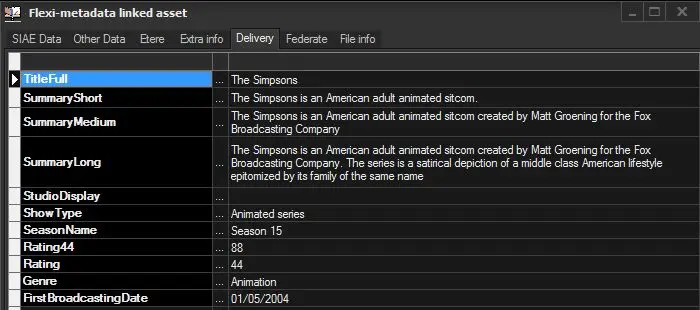
Function - Flexi-metadata linked asset
Description : Open a form to allow viewing and compiling the SMPTE Metadata of the asset linked to the order line:
Bms_ott_metadatacompilitation
NB: The form displayed here is the same available in the Media Library for managing assets metadata.
Function - Delete link to program (single/season)
Description : Remove the association between then order line and the program (single or season).
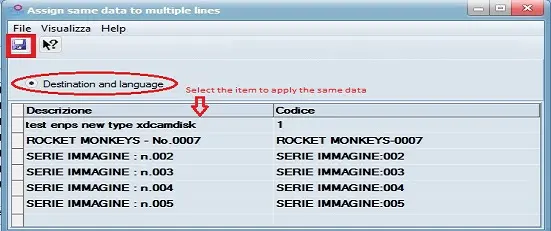
Function - Assign same data to multiple lines based on selected item
Description : By using this function, you can select item containing the language and destination data and apply the same data to multiple contract lines and overwrite the values at one go.
The “Destination and Language” option must be enabled when selecting the item to apply.
Bms_delivery_order_assign
Upon completion, the values of Destination and Language would applied to the Destination field and Language field respectively in the Main Data tab of the Delivery Order.
Function - Delete line
Description : Definitively removes the selected line from the current Delivery Order.
 Bms_ott_metadatacompilitation
 Bms_delivery_order_assign