88.2.3 Encoder tab
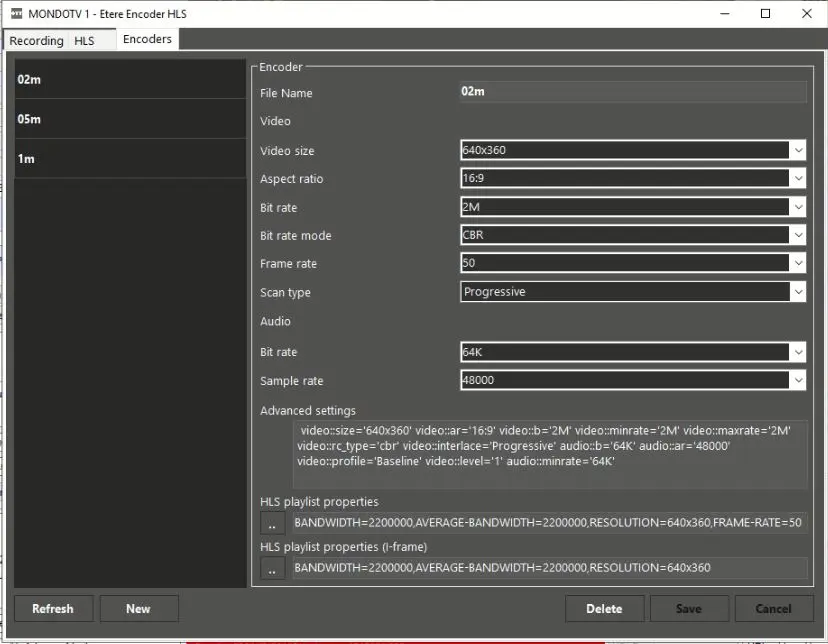
The Encoder tab enable user to setup encoder with different formats. You can click the <New> button to add a new encoder, or select an existing encoder and modify its configured settings, or delete an existing encoder with the <Delete> button.
Etere_encoder_hls_encoders
Encoder
Parameter - File name
Description : It displays the name of the given encoder.
Video
Parameter - Video size
Description : It displays the appropriate video size when the encoder was created.
Parameter - Aspect ratio
Description : It displays the aspect ratio of the encoder.
Parameter - Bit rate
Description : It displays the selected video bit rate, e.g. 500k, 1M, 2M, etc.
Parameter - Bit rate mode
Description : It displays the selected bit rate mode, e.g. Auto, CBR, VBR, or AVBR.
Parameter - Frame rate
Description : It displays the selected frame rate.
Parameter - Scan type
Description : It displays the type of scanning, e.g. Auto, Interlaced, or Progressive.
Audio
Parameter - Bit rate
Description : It displays the selected audio bit rate, e.g. 64k, 96k, 128k, etc.
Parameter - Sample rate
Description : A sample rate would be displayed.
Parameter - Advanced settings
Description : All settings defined in above would be displayed in the field.
Parameter - HLS playlist properties
Description : Define the specific tags to be written in the master “.m03u8” file in primary playlist during recording.
When all required parameters are fulfilled, click the <Save> button to save the configuration settings.
 Etere_encoder_hls_encoders