70.5.4 Transporting LTO Tapes to DR site
This section document the procedure to copy the Production data from Production media pool to a Disaster Recovery (DR) media pool, transport the LTO tapes containing the Production data from DR media pool to the DR site in the event of contingency, and import the LTO tapes into database in DR site to recover the production data. A diagram below illustrate the disaster recovery process with the description of the procedures followed.
DS Asset From Data
1.Create a DR media pool
A media pool is a collection of tape media containing data files with common properties, system database backup, it can be used for archive and restore, as well as for recovery of system databases at the DR site in the event of contingency.
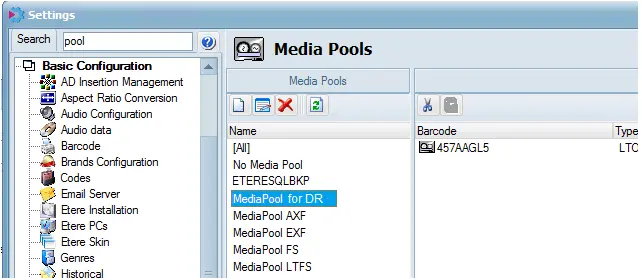
Launch Configuration module, access Settings > Basic Configuration > Media Pools, click the “New” button to create a new media pool.
Settings
Give an appropriate name to the new media pool (e.g. MediaPool for DR) to identify it relevant definition. You can assign as many LTO tapes as possible to the new media pool, or match the number of LTO tapes in Production media pool to cater for database recovery purposes.
2.Copy from Production media pool to DR media pool
Next, copy the contents in Production media pool to the DR media pool in order to create a duplicated set of LTO tapes for recovery at DR site.
Launch HSM Headquarters, select Migration from the Tools menu to open a Migration dialog box.
In the Migration dialog box:
Etere HSM - Headquarters 1
Select option “Data migration between media types”
In the Type column, select the LTO tape from the source and destination
In the Media Pool column, select the Production media pool as the source media pool, and select the newly created DR media pool as the destination media pool. Click the <Migrate> button to start migrating from Production media pool to DR media pool.
oRepeat the above steps to migrate all LTO tapes in Production media pool to the DR media pool.
3.Transport of LTO tapes to DR site
Once all the contents in Production media pool has been migrated to media pool for DR, all assigned LTO tapes in media pool for DR needs to be transported to DR site for restoring into databases in DR site. The transporting of LTO tapes to DR site must be managed by professional mover and escorted by company staff to safeguard the LTO tapes from tempering.
4.Import LTO tapes at DR site
In the DR site, the contents in LTO tapes must be re-catalogue in HSM Library in order to populate the contents in the tapes to the assets in database.
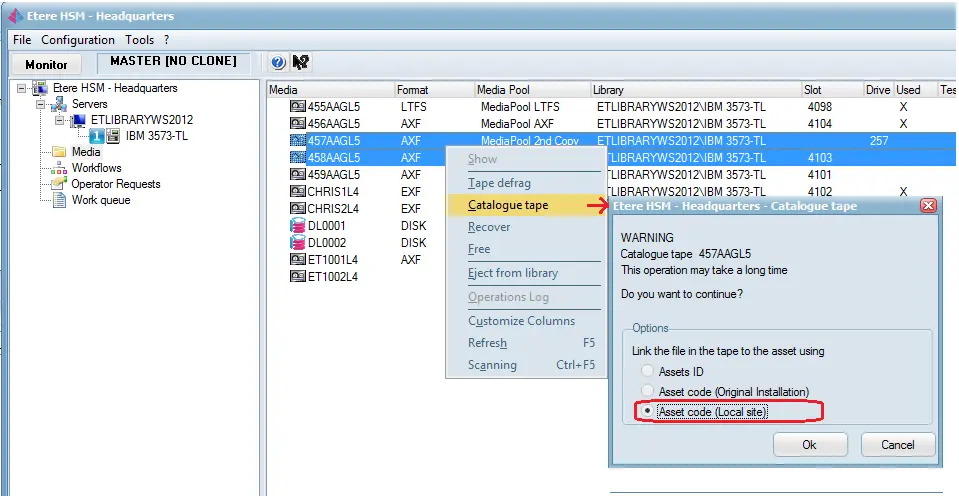
First, load the LTO tapes into tape drive to be displayed in the HSM Headquarters. In the Media section, select the desired LTO tapes, right click and launch the Catalogue Tape feature.
Etere HSM - Headquarters 2
In the Headquarters – Catalogue Tape window, select “Link the file in the tape to the asset using” with option “Asset code (local site)”. By selecting this option, data files in LTO tapes would be linked to assets with the same asset code in the DR’s database, without considering the original asset code in the Production site. If the assets could not be found in DR’s database, new assets would be created.
Upon completion, Operations can be resumed at the DR site.
 Etere_HSM_-_Headquarters_1
 Settings
 Etere_HSM_-_Headquarters_2
 DS_Asset_From_Data