59.7.3.9 Add AWS S3 Storage device
This chapter describes adding an Amazon AWS S3 storage device to perform archive and restore operations.
1. First, you must obtain a module-specific license, EA1318, from Etere for the storage device to function correctly.
2. From the Configuration > Resources Editor > Add > Archives, add an" Amazon Web Services" storage device to the resource chart.
3. Next, edit the "bucket name" and "region" information that uniquely distinguishes a container of files.
- Bucket name: name contains a simple string
- List of regions:
US East (Virginia) == us-east-1
US West (N. California) == us-west-1
US West (Oregon) == us-west-2
Asia Pacific (Tokyo) == ap-northeast-1
Asia Pacific (Seoul) == ap-northeast-2
Asia Pacific (Mumbai) == ap-south-1
Asia Pacific (Singapore) == ap-southeast-1
Asia Pacific (Sydney) == ap-southeast-2
South America (Sao Paulo) == sa-east-1
EU West (Ireland) == eu-west-1
EU Central (Frankfurt) == eu-central-1
China (Beijing) == cn-north-1
US GovCloud West (Oregon) == us-gov-west-1
resource_aws
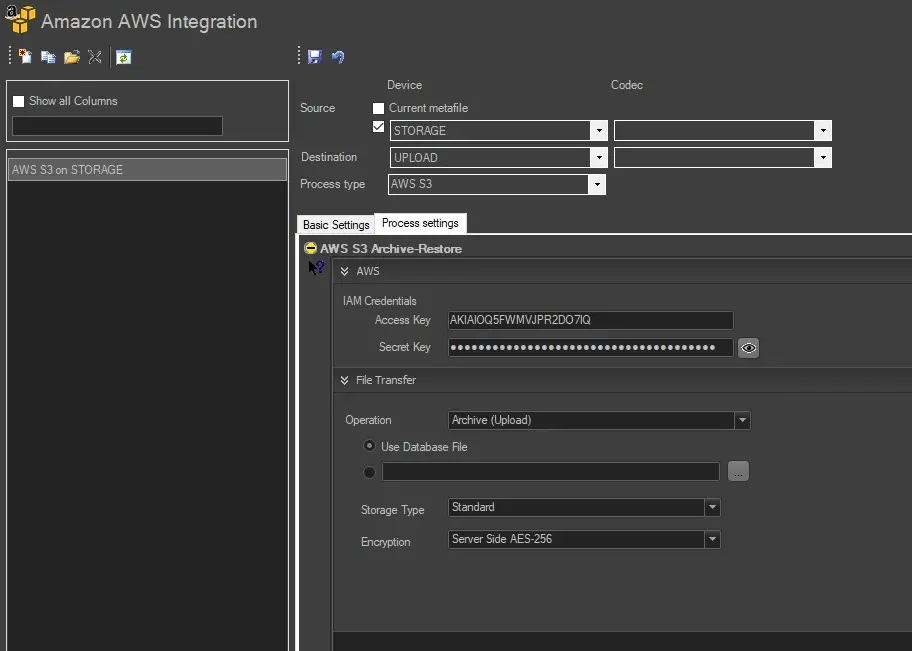
4. Next, in Etere Configuration > Configuration Editor > Datamover > Amazon AWS Integration, add new actions to perform archive and restore operations.
5. For archive and restore operation, select source and destination device and select "AWS S3" in the process type parameter. Under the Process Settings tab, fulfil the following parameters:
- IAM Credential: These are the Access Key and Secret Key provided by the AWS Administrator.
- Operation: Select an Archive (upload), Restore (download), or Delete operation.
• Archive: select the files to be archived, select a storage class to perform the archive operation, and provide the encryption method to encrypt files after archiving.
• Restore: Specify the destination path to restore the archived files.
• Delete: no additional information required.
aws_action
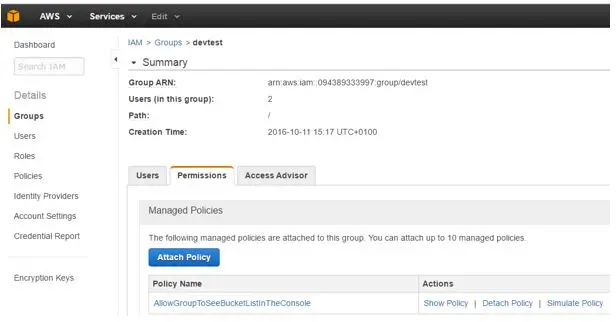
6. Next, for Data Mover to carry out the archive and restore operation, you need to enable the following AWS actions in the IAM User / Group policies for Etere to integrate with AWS:
"s3:ListAllMyBuckets",
"s3:GetBucketLocation"
"s3:ListBucket"
"s3:GetObject",
"s3:PutObject"
"s3:DeleteObject"
An example is editing the IAM Group policy to perform the archive and restore operations.
AWS
{
"Version": "2012-10-17",
"Statement": [
{
"Sid": "AllowGroupToSeeBucketListInTheConsole",
"Action": [
"s3:ListAllMyBuckets",
"s3:GetBucketLocation"
],
"Effect": "Allow",
"Resource": [
"arn:aws:s3:::*"
]
},
{
"Sid": "AllowListingOfCompanyBucket",
"Action": [
"s3:ListBucket"
],
"Effect": "Allow",
"Resource": [
"arn:aws:s3:::*"
]
},
{
"Sid": "AllowUserToReadWriteObjectData",
"Action": [
"s3:GetObject",
"s3:PutObject"
],
"Effect": "Allow",
"Resource": [
"arn:aws:s3:::*"
]
},
{
"Sid": "AllowUserToDeleteObject",
"Action": [
"s3:DeleteObject"
],
"Effect": "Allow",
"Resource": [
"arn:aws:s3:::*"
]
}
]
}
7. The next step would be building a T-workflow to perform the desired operations and launch it on the selected assets. Follow the steps described in the Workflow Action section.
 AWS
AWS
 resource_aws
 aws_action