84.4.4.84 CUSTOM > TELECAPRI INVOICES TXT
Export Scope
The Export Custom TELECAPRI INVOICES TXT export selected Air Sales invoices and contracts data to a text file.
The data format in the exported text file includes:
•It contains 25 columns separated by semicolon (;).
•The file consist of 2 types of data:
•Line starting with “TES” indicate file header.
•Line starting with “RIG” indicate line data.
•One header with multiple lines data form an invoice.
•Invoices within the specify range would be exported in the text file.
•The exported file name format is “Orders_ftStart_ftEnd_yyyy.txt”, e.g. “Orders_ft100_ft150_2018.txt”, where "ft100_ft150" indicate the invoices number selected in the export parameter.
Parameters
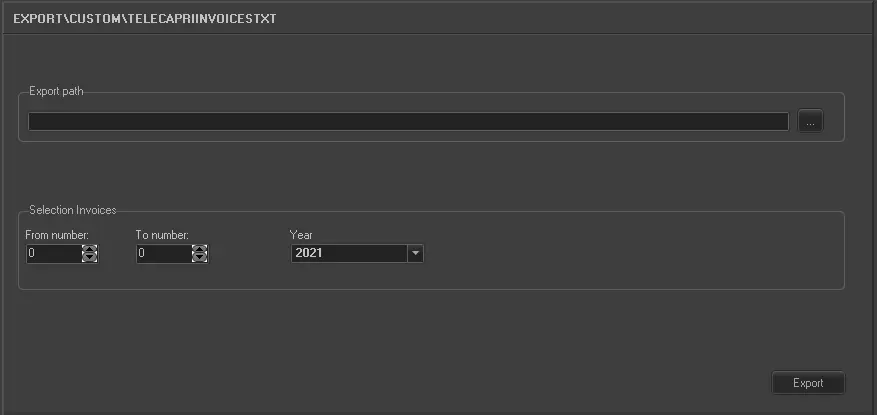
Export_custom_telecapri_invoices_txt
Export path:
•Specify the path where the exported text file would be stored. You can use the browse button to locate the path in local or network drive.
Selection Invoices:
•From number – To number: Specify the starting invoice number and ending invoice number to export the invoices.
•Year: Select the reference fiscal year to export the invoices matches the invoice numbers.
Launch the export
Once the export has been configured, it can be started just by pressing the <Export> button.
 5193_Export_custom_telecapri_invoices_txt