70.3.7.2 Move
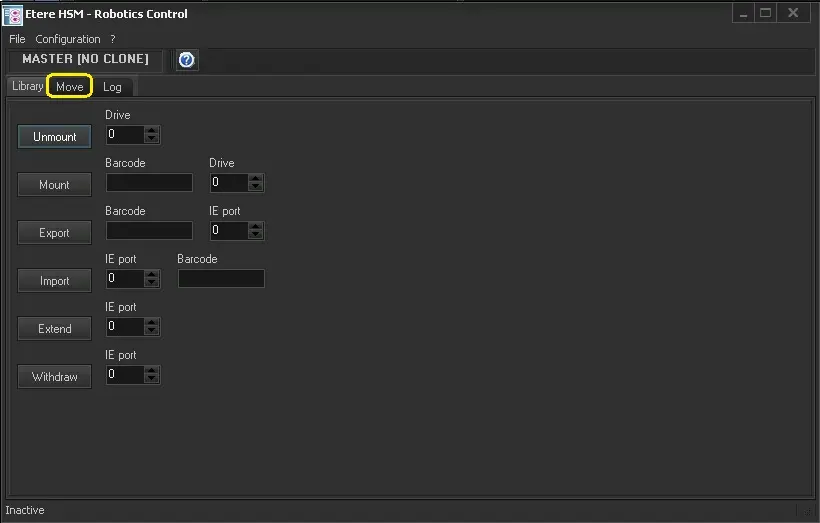
The "Move" tab, hidden by default, is intended to be used for quickly testing the most common operations provided by Etere HSM for the management of tapes. In order to enable this section and access its testing functions just use the [CTRL - SHIFT - ALT - M] keys combination:
Unmount - Unload the tape currently mounted in the given drive.
Mount - Searches for the tape matching the given barcode and load it into the given drive.
Export - Searches for the tape matching the given barcode and put it into an export slot.
Import - Take the tape in the IE port and and put it into an import slot. The barcode will be automatically detected.
Extend - Extends the IE port (mechanical arm) that brings tapes out from the library.
Withdraw - Withdraw the IE port (mechanical arm) that brings tapes into the library.
NB:
1.When a “Move” command is executed on tape library, HSM Robotics would perform a scanning of Tape Library content and update the tape inventory in SQL database to ensure the source and destination elements are intact to fulfill a successful "Move" command.
2.When tapes are manually removed from the slots in tape library, the tape labels would remain in “IE Ports” and the tape inventory in database would not be updated. You would need to perform Scanning from Headquarters to update the tape inventory and remove all obsolete tape labels in the “IE Ports”.
 Move
Move