63.3.2 Playout
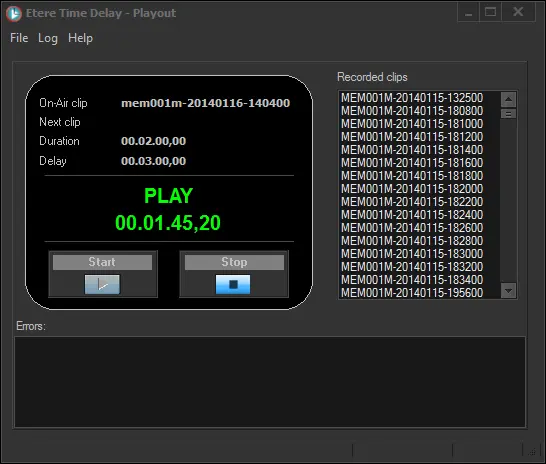
The "Time Delay - Playout" module allows playing back (with a configured delay) the clips previously captured by the Ingest module. The main interface is following described:
Time Delay - Playout
LEFT PANEL - Playback controls and information. Here are displayed the following elements:
▪On-Air clip: Name of the clip being currently played
▪Next clip: Name of the next clip meeting playout requirements
▪Duration: Length of the currently playing clip
▪Delay: Time configured for delaying the playout
▪PLAY status: Red indicates idle, green indicates playing.
▪PLAY time: Time elapsed since the playback started.
▪[Start] : Trigger a new playback
▪[Stop] : Interrupt an ongoing playback
RIGHT PANEL - List of all recorded clips stored in the server. Clips are displayed detailing the following information:
▪Name: Filename based on a specific file naming format (e.g. MEM001M-20130127-124853.MXF) that includes key information for their future playback.
BOTTOM PANEL
Errors encountered during the playout process will be displayed in this section.
Starting a playout
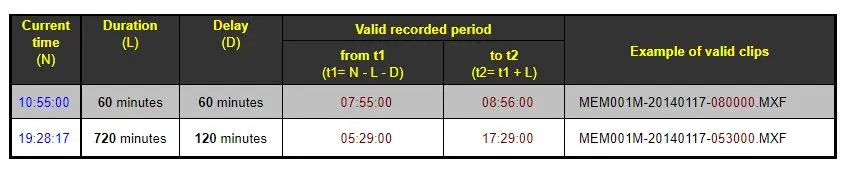
Press the [Start] button to trigger the playback of clips. The application will automatically and continuously play clips as long as they are available. The application's criteria that determines which clip is played has been illustrated in the following examples:
Application's criteria
NB: Please note that all times (current, recording, filename) are intended as UTC since clips are recorded in UTC format.
It's worth mentioning that in case no file matching the above criteria is found after the [Start], a warning message will be displayed informing about the unavailability of a clip to be played.
 Application's_criteria
 Time_Delay_-_Playout