84.4.4.66 CUSTOM > EPG DIGITALB XML
Export Scope
Extract file containing the EPG schedules of one day to maximum of 31 days, into an XML format file.
In the exported XML file, the following fields are exported as per criteria:
- The nibble data field must be export as numeric data, if the field is empty (e.g. “”) the value would be set to “0” in the export XML file.
- The event start time would be exported in UTC time, rather than local time.
Export Parameters
The following parameters required in order to export the file:
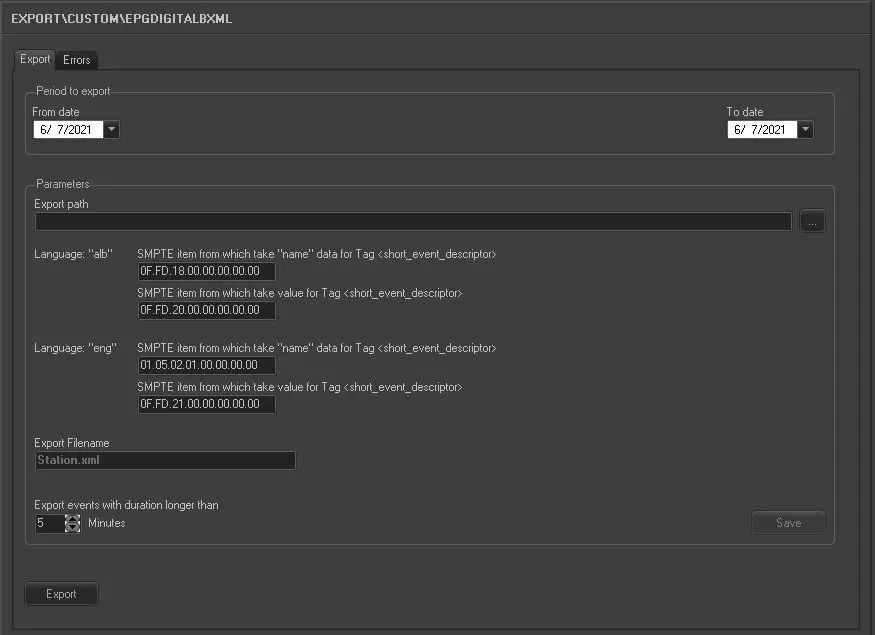
Export_custom_epg_digitalb_xml
Period to export: indicate the date range for exporting the file, within a maximum of 31 days.
Export path: indicate the directory path where the file will be park for exporting.
The export can managed up to 2 languages:
The first language is taken from field “FSERIE.LINGUA_1”, where the language name is taken from field “FILMATI_DESCRIZIO_1.
The second language is taken from field “FSERIS.LINGUA_2”, where the language name is taken from field “FILMATI_DESCRIZIO_2.
•Language: “alb”
oSMPTE item from which take “name” data for Tag <short_event_descriptor>: Extract custom flexi-metadata containing the title in Albanian
oSMPTE item from which take value for Tag <short_event_descriptor>: Extract custom flexi-metadata containing the short description in Albanian
•Language: “eng”
oSMPTE item from which take “name” data for Tag <short_event_descriptor>: Extract the standard SMPTE metadata containing the original title.
oSMPTE item from which take value for Tag <short_event_descriptor>: Extract the custom flexi-metadata containing the short description in English.
Export Filename: indicate the XML filename to be created after export complete, e.g. station.xml, where the actual workstation name will replace the “station” name in filename.
Export events with duration longer than: only export events with duration longer than the time value specified in the parameter. Save the setting after entered the value. Events duration shorter than the specific time will be dropped.
Launch the export
Once the parameters are set, the export can be simply launch by clicking the <Export> button.
 5171_Export_custom_epg_digitalb_xml