65.6.1 Playlist panel
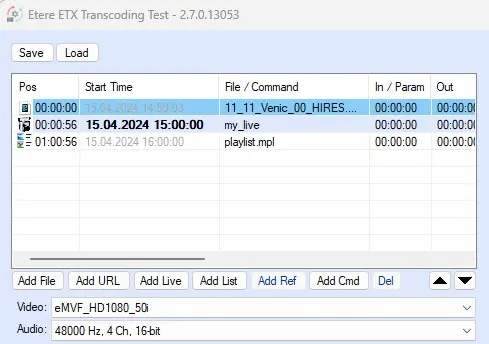
This panel, placed on the top left corner of the module, is where the source elements and their properties can be defined.
playlist_panel
Above the playlist table, the button Save allows to export a playlist in .mpl or .xml format, while the Load button allows to import a previously saved playlist.
The playlist table features the following columns:
• Pos: The timecode in this column indicates the position of the element in the playlist.
• Start Time: The start time (based on the system time) of the element. By default, the first element's start time is 0, but it's possible to insert a specific time and date. By default, the start time of each next element will be set according to the duration of the previous one.
• File/Command: Here is displayed the name of the video file, playlist file, live, URL or the command inserted, according to the element type added.
• In/Param: This is the start timecode of the element. In case of a video file, for example, it's possible to specify here a logical mark in (SOM) different from zero, so that the file begins playing after the physical start. The file duration will decrease accordingly.
• Out: This is the end timecode of the element. In case of a video file, for example, it's possible to specify here a logical mark out (EOM) different from zero, so that the file ends playing before the physical end. The file duration will decrease accordingly.
• Len: The logical duration of the file, considering also any possible In or Out parameter already set.
• State: The playling status of the element.
• Media: In this column are displayed some additional information about the elements such as resolution, frame rate, aspect ratio, etc.
• Path: The path where the file is stored.
Elements can be added and removed using the button placed below the table. Please refer to chapters from 65.2.1.1 Add File to 65.2.1.7 Del for more detailed information.
Right below the buttons, two comboboxes allow to specify the source video format and audio format.
 playlist_panel