59.5.4.82 Revenues by Commercial Contained in Program
Report Description
This report captured the commercial loading of each program per day expressed in minutes. It keeps track of the loading per initial telecast and replays. The information captured in the report is as follows:
-Initial telecast: this is the total amount of commercial in the block for the given period set in the parameter.
(Note: If the report dates are out of range of the first airing time, the initial telecast value in the report would be shown as 00:00).
-Replays: replay the same number of commercials in the block.
-Program: you can add a program or multiple programs to extract into the report.
-Sales: the sales amount.
-Total sales: the total sales amount.
In some instances where the duration of all the commercials does not match the one in the generated report, it is essential to take note in the initial telecast column, where the report program only captures commercial programs with properties type defined as “COM”, if there are other programs (e.g. PROMO, News Updates) having the properties type defined as “COM” it would result in a discrepancy in the report.
Report Filters
The following parameters are required to fulfil report generation:
-Date range: specify the start date and end date to retrieve data from the database
-Select Program: Right-click, select Add program, remove program, or remove all programs added previously.
-Include Secondary Events: If checked, it includes capturing secondary events in this report.
Report Preview
Once the parameters are entered, click the <Preview> button to preview the report. The <Settings> button enabled you to set the report layout using the <Print> button before printing it out.
Revenues_by_Commercial_Contained_in_Program
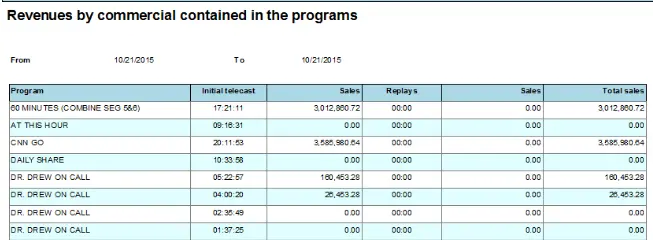 Revenues_by_Commercial_Contained_in_Program