59.5.4.49 Scheduling/ Parameters
The scheduling of an order line (commercial event) begins with the insertion of all the technical data relevant to the commercial event; this data is inserted along the fields present in the Parameters tab as follows:
Parameter - Product Code
Description: Select from the list of Nielsen categories the one that best meets the product to be advertised. Once the product code is selected from the categories, the product name on the product description will be imported. The product code set for the currently selected customer is displayed by default. You can also add new code to the Nielsen categories by double-clicking on the description of Order or Proposal.
Correct categorization of commercials will allow effective scheduling where commercials with the same product code will be avoided from being performed incorrectly (i.e. in the same segment).
NB: Product categories are predefined in Etere Configuration > Settings > Product categories.
Parameter - Event Type
Description: Select the type of segment the commercial event relates to. You need to ensure that the chosen segment type is allowed to contain commercial events. This is dictated in Etere Configuration | Settings | Types or Groups.
Parameter - Station
Description: Set the station on which the order line is intended to be scheduled; by default, the current station is selected.
Disabled-Order/proposal lines will be available -besides from their input station- also from the stations assigned to their lines.
Enabled-order/proposal lines will be available -besides from their input station- also from any other station.
NB: Viewing the Order lines/Proposals across stations is possible only if the option "Enable orders visibility from all stations" is enabled in Air Sales parameter settings. This option is disabled by default.
NB: Modifying orders lines from their input station (e.g. channel 01) is allowed to all users; instead, the "Sales Proposal\Lines_edit\Others_than_owner" right is required to enable users to modify from a different station (e.g. channel 03) all those lines assigned to said station (e.g. channel 03).
Parameter - [Stations]
Description: This button allows you to automatically create a duplicate order line that you can allocate to a different station or link the same asset form to more stations. In the first case (create a new asset), you are due to schedule the parent form; you will also be asked to confirm if the commercial scheduling relates to all connected forms (and, as such, to be scheduled to air on all stations).
Parameter - [Ad Insertion]
Description: Select the network(s) the commercial is expected to transmit. Target networks can be:
Main network(0) - If selected (default), the commercial (e.g., a national advertisement) will be scheduled to be transmitted across all networks.
The main network is the one that holds the programming expected for all networks (e.g. regions).
Regional networks(1, 2, 3...) - If selected, the commercial (e.g., a local advertisement) will be scheduled to be exclusively transmitted across the chosen network. Only one network can be established.
The regional networks are used for Ad Insertion (See Etere Ad Insertion), that is, for transmitting specific advertisements on a targeted network.
NB: If the "check product code" rule is enabled, the system will check for category conflicts between commercials scheduled in the leading network and those scheduled in the ad insertion network.
Parameter - [Calculate]
Description: Check the priority of all events scheduled from this order line, setting it back to the order line's importance in case the system finds that it has been amended.
Parameter - Priority
Description: The priority of an event is the criteria used by Etere to determine its position within a commercial cluster during the scheduling phase. This priority goes from 1 (highest priority) to 1000 (lowest).
Please note that this value will be customizable in case the scheduling type is by 'Priority', 'Rotation' and 'Optimization'; for the other types, it will have a fixed priority value:
1,2 - Jingles
3 - Top
500 - Default (i.e. Air Sales will assign a random scheduling priority)
501 - Middle
997 - Bottom
998 - Integration Filler
999 - Split Filler
Parameter - Duration
Description: Specify the duration of the commercial event in minutes and seconds 0000:00:00.
Parameter - DD Expiration
Description: The status of booked events inserted into schedules can be either confirmed or unconfirmed depending on this parameter:
0 - Leave this parameter to "0" so booked events will be automatically confirmed; no further confirmation will be necessary.
"n" - Set a custom value so booked events will remain in the schedule for "n" days after their scheduling. Once this period has passed, if no confirmation has come through, they will be automatically removed from the schedule.
Parameter - Max Daily Run
Description: Specify the maximum times the commercial event can be scheduled on any particular day. This is used in the automatic reservation process.
Parameter - Event Interval
Description: Minimum gap that there must be between two runs of the same event. This parameter avoids scheduling two runs of the same event too close to the schedule.
Parameter - Order interval
Description: Minimum gap that there must be between two event runs of the same order. This parameter avoids scheduling two event runs of the same order too close to the schedule.
Parameter - Customer Interval
Description: Minimum gap that there must be between two event runs of the same customer. This parameter avoids scheduling two event runs of the same customer too close to the schedule.
Parameter - Start Time (00:00:00)End Time (00:00:00)
Description: The start time and end time parameters allow you to set a specific on-air time slot for the commercial event in question, specifying, for instance, that you only have the event to air from 7 p.m. (start time 19:00:00) through ten o'clock in the evening (end time 22:00:00).
Parameter - White List Priority
Description: The white-list-priority is the criteria that permits one to decide what to do if the pre-assigned space of a -currently scheduled- event is occupied by another already scheduled one. This can be set as follows:
0 - The use of 'white lists' will be disabled (default)
1-100 - This value will be considered to try to schedule events into their assigned space even if it's occupied by another event (with a lower priority).
Note1: If the line is "free", it will be able to replace only other "free" contractual events (with a lower white list priority).
Note 2: If the line is "top&bottom", the white list priority must be zero (otherwise, a warning message will be displayed).
Parameter - Related Order in the Same Segment
Description: Optionally, link to the current order line (parent) an event featured in a different order (child) so, every time the commercial event from the parent order line is scheduled, the linked commercial event from the child order line will also be automatically scheduled in the same segment.
NB: This function works only one way. If the child's event is scheduled independently, the parent's event won't be scheduled.
Once all the relevant parameters have been inserted, press the [Apply] button to save the order line before moving through the other tabs.
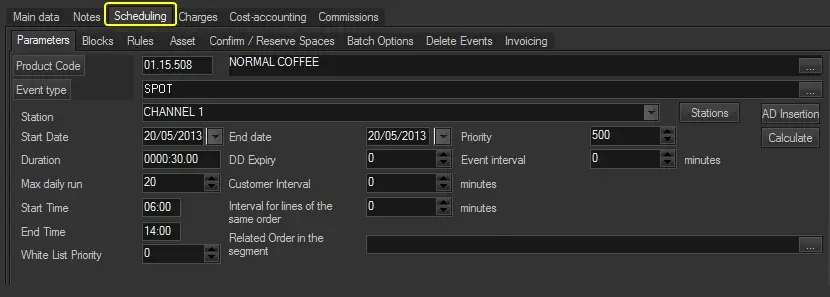 Scheduling