84.4.5.33 STANDARD > RCS
Import Scope
The RCS import allows to import a broadcast schedule exported from a DVB-RCS system into a plain-text (.txt) file.
Importing parameters
In order to use this import function, it will be required to first set the parameters present under the following tabs:
Import_standard_rcs
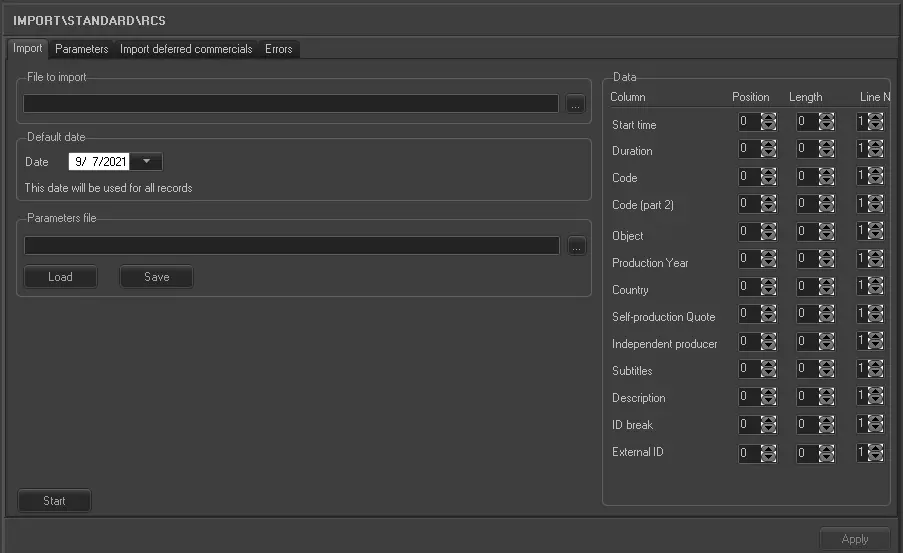
Import
(set here the main parameters (where, which and when) related to the import)
File to import - Specify the file containing the data you wish to import. For detailed information on the lines structure of this file please refer to the "Sample imported file" section at the end of this chapter.
Default date - Specify the date of the schedule the data needs to be imported to.
Data - Specify the position of the data within the import file. In this type of import, data identification doesn't depends on character separators but on the position in the file and the number of characters.
Data : 0
Position - 1
Data : 8
Position - 2
Data : :
Position - 3
Data : 0
Position - 4
Data : 9
Position - 5
Data : :
Position - 6
Data : 0
Position - 7
Data : 3
Position - 8
Data : :
Position - 9
Data : 0
Position - 10
Data : 0
Position - 11
Data : :
Position - 12
Data : 0
Position - 13
Data : 3
Position - 14
Data : :
Position - 15
Data : 5
Position - 16
Data : 2
Position - 17
Data : :
Position - 18
Data : 0
Position - 19
Data : 0
Position - 20
Data : :
Position - 21
22 - C
23 - 0
24 - 4
25 - 2
26 - 4
27 - 2
28 - 8
29 - :
For instance, in the above example, data is positioned as following described:
▪The event's start time (08:09:03) is located in the position 1 and it's made up of 8 characters,
▪The event's duration (00:03:52:00) is at position 13 and it's made up of 11 characters,
▪The event's code (C042428) is at position 22 and made up of 7 characters.
NB: In order to deactivate a certain data field (i.e. in order to not import it), just set its "position field" value to "-1". Moreover, remember that the "time" and "duration" format can be set in the parameters section.
Parameters file - Set here the .ini file (e.g. mysettings.ini) to be used for saving/loading the parameter settings. This function is useful, to for example, save the current workstation settings and subsequently use them on a different workstation.
Import_standard_rcs_1
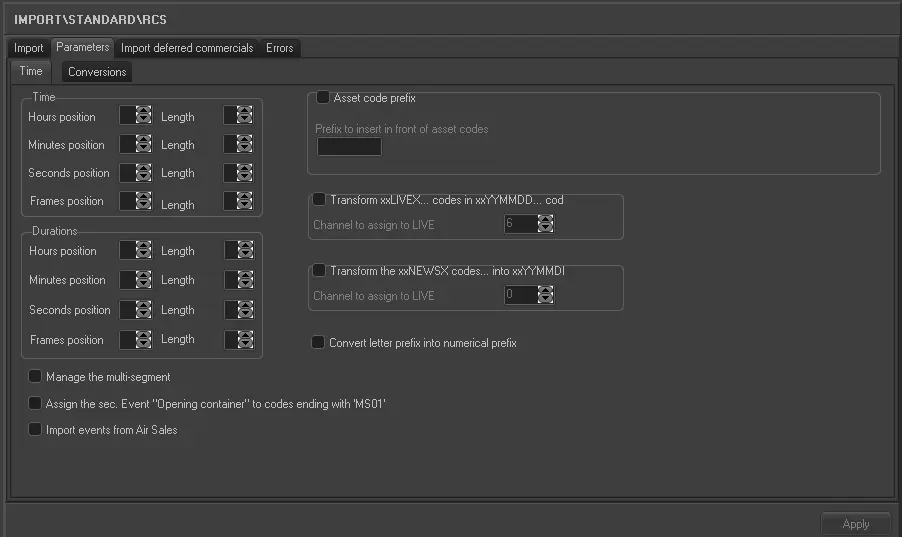
Parameters
(set here the parameters related to how to import time data and how to convert specific values:)
Time - Specify here some more information regarding the format of the time and duration values to be imported:
Time - Define the format (i.e. position and length) of the event's scheduled times, that is, their hours, minutes seconds and frames.
Durations - Define the format (i.e. position and length) of the event's scheduled durations, that is, their hours, minutes seconds and frames.
For example, Time could be made up of hh:mm:ss or it could also include frames hh:mm:ss,ff. In the later case you would input Hours position 1, length 2; Minutes position 4, length 2; Seconds position 7, length 2; for the frames position input 10, length 2.
Moreover, also set the following parameters:
Parameter - Asset Code Prefix
Description : It is possible to insert a prefix to the asset code read in the import in order to carry out specific controls.
Parameter - Transform xxLIVEX… codes into xxYYMMDD...
Description : If enabled, all imported asset codes containing the "LIVEX" string (from the third character onwards) will be renamed replacing that string in YYMMDD (year, month and day) of the imported schedule.
Please note that it is also possible to define such codes as NEWS by inserting in the media '0LIVE0000X' where x is the number of the chosen channel. If the channel is 0, the media is not filled.
Parameter - Transform xxNEWSX… codes into xxYYMMDD...
Description : If enabled, all imported asset codes containing the "NEWSX" string (from the third character onwards) will be renamed replacing that string in YYMMDD (year, month and day) of the imported schedule.
Please note that it is also possible to define such codes as NEWS by inserting in the media '0LIVE0000X' where x is the number of the chosen channel. If the channel is 0, the media is not filled.
Parameter - Convert Letter Prefix into Numerical Prefix
Description : Allows you to convert the Asset codes in a particular way. If the code begins with a letter it is converted into thousands and added up to the figures following the letter. For example, A001 à 10001, B011 à 11011 etc.
Parameter - Manage the multi-segment
Description : This parameter allows you to also manage the multi segments in the file that is being imported.
Parameter - Assign the secondary event "opening container" to codes ending with "MS01"
Description : If enabled, the "opening container" secondary event will be assigned to all the imported assets which code ends with the "MS01" string.
Please note that "opening containers" allows to define the point on which the transmission of a certain block of events starts, where as "closing containers" allows to define the point at which that block ends.
Parameter - Import event from Air Sales
Description : If enabled, there will be be imported, besides events scheduled in normal playlists, also those scheduled in "Air Sales" playlists, this, only if the target times counts with a proper scheduling structure (i.e. blocks and segments).
Conversions - Enables you to identify the typologies and the countries of codes to import as RCS uses its own definition which needs to be converted into that of Etere. In the Object window, the association between RCS Object and the Etere Typology is shown. In the Country window, the association between RCS Nation and Etere Nation is shown. The following tables identify the Etere – RCS Object and Country conversions:
RCS Object - A
Etere Type : 13A
RCS code : 1
Etere Country : GB
RCS Object - B
Etere Type : 13D
RCS code : 2
Etere Country : US
RCS Object - C
Etere Type : 13G
RCS code : 3
Etere Country : JP
RCS Object - D
Etere Type : 14A
RCS code : 4
Etere Country : DE
RCS Object - E
Etere Type : 14B
RCS code : 5
Etere Country : FR
Import_standard_rcs_2
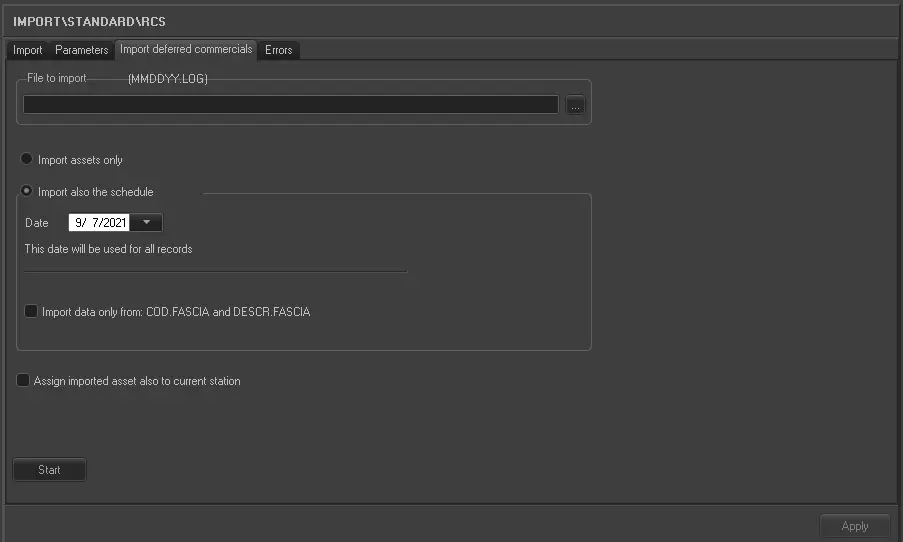
Import deferred commercials
For detailed information on the import function available under this tab please refer to the specific chapter:
Launch the import
Once the import has been configured, it can be started just by pressing the <Start> button, once the import has finished, it will be possible to display the schedule of the related day to verify and/or approve the import operation.
Sample imported file
Every data (i.e. event) defined in the imported file can be structured on either one or two lines:
1-line data:
--------------------------------------------------------------------------------------------------
1 2 3 4 5 6 7 8 9 0 1
1234567890123456789012345678901234567890123456789012345678901234567890123456789012345678901234567890123456789
--------------------------------------------------------------------------------------------------
07:00:00;00:00:00:00;0700 TH ; ; ; ; ; ; ;0700 ;
07:00:00;00:00:00:00;HH 0700 ; ; ; ; ; ; ;!! HARD HIT 0700 !! ;
07:00:00;00:00:14:00;PI50073 ; ; ; ; ; ; ;WAKEUP TITLES ;
07:00:14;00:05:28:00;C073540 ;y;2007;2;C; ; ;LOVE STONED ;
07:05:42;00:00:08:00;P070495 ;Q;2007;9;A; ; ;LIVE EARTH B/B*SMART+VO;
07:05:50;00:01:09:00;G075529 ; ; ; ; ; ; ;LIVE EARTH CARBON CRISI;
07:06:59;00:00:08:00;P070495 ;Q;2007;9;A; ; ;LIVE EARTH B/B*SMART+VO;
07:07:07;00:03:47:00;CC55938 ;y;2007;1;C; ; ;RELAX,TAKE IT EASY ;
07:10:54;00:00:07:00;A921978 ;z; ; ;C; ; ;Vodafone-ODS-Antonacci-;{WU0701}
07:11:01;00:00:51:00;P070494 ;E;2007;9;A; ; ;LIVE EARTH TUNE IN SAT0;
07:11:52;00:00:08:00;P070340 ;U;2007;9;A; ; ;BUMPER #10 HIP HOP ;
2-lines data:
--------------------------------------------------------------------------------------------------
1 2 3 4 5 6 7 8 9 0 1
1234567890123456789012345678901234567890123456789012345678901234567890123456789012345678901234567890123456789
--------------------------------------------------------------------------------------------------
07:00:00;00:00:00:00;0700 TH ; ; ; ; ; ; ; ;
;0700 ;
07:00:00;00:00:00:00;HH 0700 ; ; ; ; ; ; ; ;
;!! HARD HIT 0700 !! ;
07:00:00;00:00:14:00;PI50073 ; ; ; ; ; ; ; ;
;WAKEUP TITLES ;
07:00:14;00:03:41:00;C082903 ;y;2008;1;C; ; ; ;
;VIOLET HILL ;
07:03:55;00:03:56:00;C081304 ;y;2008;1;C; ; ; ;
;BETTER IN TIME ;
07:07:51;00:00:38:00;P080354 ;E;2008;9;A; ; ; ;
;SUMMERTIME IDENT 08
 5245_Import_standard_rcs_1
 5244_Import_standard_rcs
 5243_Import_standard_rcs_2