72.4.2.2 Quick Management Features
Quick management features are defined in the worksheet's related action (Configuration Editor > Workflow > Actions), and as their name suggest, they are kind of shortcuts for quickly accessing the features required for completing a task (e.g. ingest asset, upload file, etc).
The features currently supported by the Agenda View for quick management are listed below:
Feature - Media Library
Description : Open the Media Library module, allowing to modify the asset's information (e.g. metadata, etc.).
NB: In order to launch this module it's required to press the [Media Library] button.
Feature - Subtitles Tool
Description : Open the Subtitles Tool module, allowing to produce subtitles (e.g. manual typing or import).
NB: In order to launch this module it's required to press the [Execute] button.
Feature - Asset ingest
Description : Open the Multifunction Ingest module, allowing to acquire content (e.g. from video server).
NB: In order to launch this module it's required to press the [Execute] button.
Feature - Metadata indexing
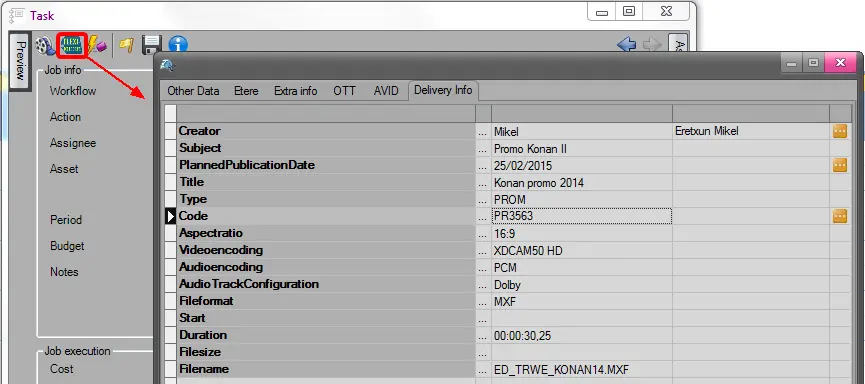
Description : Open the Metadata Indexing module, allowing to add metadata to the asset.
Metadata indexing
NB: In order to launch this module it's required to press the [Flexi-metadata] button
Feature - Video file upload
Description : Open the Media Library module, allowing to import files into a cloud-device (e.g. NLE Storage).
NB: In order to launch this module it's required to press the [Execute] button.
Feature - Video file download
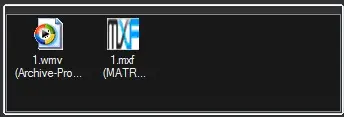
Description : Show a list of files linked to the asset, allowing to download them through a drag&drop into a specific target (e.g. File explorer, Non-linear editor):
Video file download
In order to be displayed here, the requirements below must be meet for asset's files:
The codec must be enabled for download (Configuration > Settings > Devices > Codec)
The media folder must have a non-ftp download path (Configuration > Settings > Web > Media Folder)
Feature - Censorship
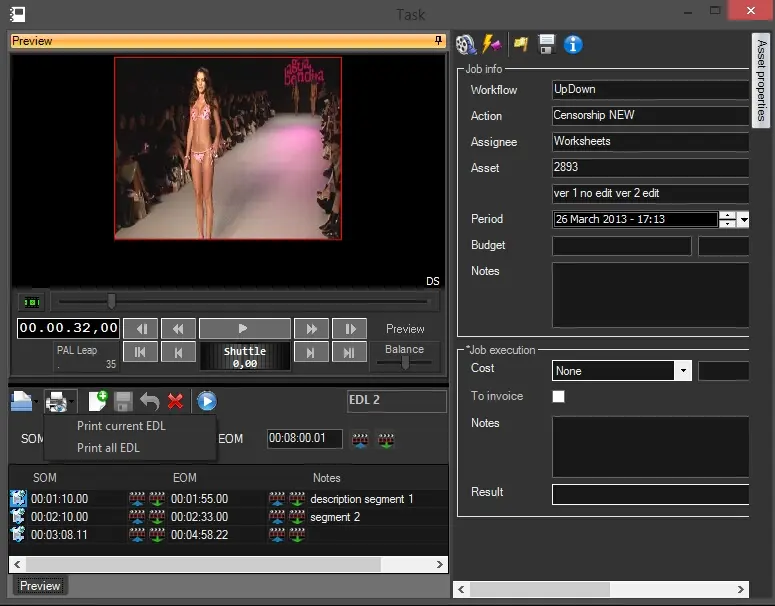
Description : Show an EDL editor in the preview slide bar, allowing to insert, delete, preview and modify EDL segments (e.g. to cut because censored) including their SOM and EOM timecode marks. A special feature allows printing one or all EDL's into a cue sheet report:
Censorship
NB: The EDL used for censorship will be the first available in the asset (i.e. the one without any segments).
NB: The preview is lowres, for a hires preview access the [MAM_TasksMan_02 Media Library] and watch the hires clip.
Feature - Nunzio Story Editor
Description : Open the Etere Nunzio module, allowing journalists to prepare a story for the asset (placeholder) and directors to evaluate the story for approval.
NB: Please note that all operations derived from functions are recorded into the system (i.e. assignee, date, etc). Recorded logs will be available from both, the "Media Library > Operations" tab of the related asset and the Media Library operations [Resources Manager] report.
 Video_file_download
 Censorship
 Metadata_indexing