72.4.1.2 Calendar Schedule
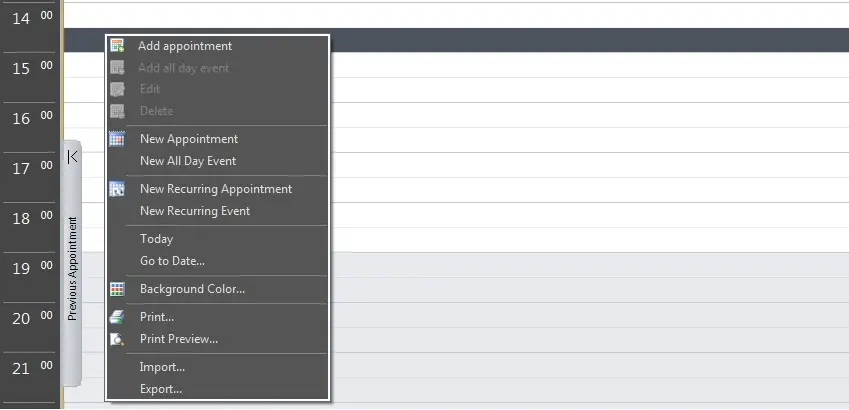
Among the functions available in the Schedule area, the following contextual ones can be mentioned:
Calendar Schedule
Add appointment - Inserts a new appointment in the selected position of the agenda:
Subject - Enter the scope of the appointment (e.g. outdoor shooting).
Start-End - Specify the date and time duration of the appointment.
Notes - Enter any eventual note on the event.
Color - Select the color with which the appointment will be displayed.
Add all day event - Inserts a new appointment already set to last for the entire day.
Edit - Modify the selected appointment data (subject, start-end, notes, color).
Delete - Cancels the selected appointment, removing it from the agenda.
New appointment - Inserts a new appointment based on the following options:
Subject - Enter the scope of the appointment (e.g. outdoor shooting).
Location - Select the location (e.g. studio 5, outdoors) where the appointment is intended to take place.
Label - Select the nature of the appointment, that is, the color with which the appointment will be displayed in the calendar.
Dates & times - Specify the date and time at which the appointment is due to start and finish.
All day event - Enable it to make the appointment last for the entire day on given dates.
Reminder - Set the sound to be played a certain time before the scheduled time of the appointment, thus reminding the user about it.
Show time as - Select the status (busy, free, out-of-office or tentative) that the contact will have during the duration of the appointment. This status will be displayed in the calendar as a vertical bar on the left side.
Notes - Enter any text aimed to further explain the appointment.
Contact - Choose the contact for which the appointment will be inserted.
Category - In order to better classify the appointment, select the category to which it is related.
Private - Set the appointment as "private" to, for example, exclude it from exported documents.
Moreover, in the window top part it will be possible to set the following options:
Recurrence - Specify the recurrence parameters of the appointment.
Importance - Gives the appointment either a high or low priority.
Delete - Cancels the appointment, removing it from the calendar.
New all day event - Inserts a new appointment already set to last for the entire day.
New recurring appointment - Opens the form for inserting a new appointment, directly showing the recurrence options:
Appointment time - Indicate the length of the event by entering either a time interval (e.g. 09:00-12:30) or a preset duration (e.g. 2 days).
Recurrence pattern - Specify the frequency (e.g. weekly) and days (e.g. friday) with which the appoint will be recurred into the calendar.
Range of recurrence - Indicate the number of days (e.g. 5 days) or times (e.g. 10 times) that the appointment is intended to occur.
New recurring event - Opens the form for inserting a new event, directly showing the recurrence options (the same as previously detailed for new recurring appointments).
Today - Make all open calendars to display data related to the current day.
Go to date - Make all open calendars to display data related to a user-given date, being possible to select the type of view (i.e. daily, work-weekly, weekly, monthly or timeline).
Background color - Change the color set used for the calendar of the current selected contact.
Print - Generates and prints a document containing all the appointments within a certain date range, being possible to exclude private appointments. Moreover, it will be possible to select the style (daily, monthly, weekly or details) with which to show the calendar.
Print preview - Generates and display a document containing all the appointments within a certain range, allowing to set the same options and styles of the "print" function.
Import - Import a previously exported calendar.
Export - Export the entire calendar in a extensible (.xml), icalc (.ics) or binary (.dat) file format.
 Calendar_Schedule