84.4.5.13 STANDARD > GENERIC > XML ASSETS FULL
Import Scope
The XML Asset Full import allows to import assets (forms containing key asset's information) from xml files located on a certain folder. It's worth mentioning that XML filenames intended to be imported must have the following format:
Etere.Asset.SiteID_assetID_yyyymmdd_hhmmss.xml
For instance: Etere.Asset.456_4235_20130721_215513.xml
It's worth mentioning that before and after the import certain conditions are checked and some actions taken:
Before import:
The path from which to import assets is retrieved from the "import path" set in the Sites configurations.
In case an asset already exists in the local site, Etere will import it only if the date on the filename (e.g. 20130228) is greater (i.e. more recent) than the one stored in the "last import from site" metadata (e.g. 20130115).
After import:
The "Last import from site" Flexi-metadata of imported assets will be set with the current date and time (in UTC GMT +0).
The file is moved (i.e. archived) to the path specified in the import parameters.
Once imported, the Media Library will contain for all assets information on their properties (e.g. title, duration, etc), origin (external ID and site) and operations log (import operator, computer, date, etc). Moreover, it's worth mentioning that remote sites related to imported assets are automatically inserted in the List of sites.
Imported fields:
Detailed information on the fields managed by the XML Asset Full function can be found in the Supported asset fields and Sample file chapters.
Import Parameters
In order to use this option the following fields must be compiled:
Import_standard_generic_xml_asset_full
Import path - Data of imported assets will be get from single XML files matching the following name format:
Etere.Asset.[SiteID]_[AssetID]_[yyyymmdd]_[hhmmss].xml
[SiteID] - ID of the source site (e.g. 701)
[AssetID] - ID of the exported asset (e.g. 12345)
[yyyymmdd] - Date on which the asset was exported (e.g. 20130831)
[hhmmss] - Time at which the asset was exported (e.g. 102245)
NB: The date (yyyymmdd) and time (hhmmss) of exported files is always in UTC format (GMT +0).
Path where to move imported files - In case you want xml files to be moved to a certain folder once import is finished, specify it here, otherwise, leave it blank and xml files will remain on its source location
Assets must be unique - If disabled (default), assets with existing codes will be imported.
If enabled, assets with existing codes won't be imported but it will be possible to enable the "overwrite data if asset exists" option to use the XML files to update the existing assets data (e.g. seasons data, EDL data, etc).
Import also on the same site - Allows importing files from the local site.
This parameter can be set only by a "system admin" and needs conforming through the "ETERE" password.
Launch the import
Once the import has been configured, it can be started just by pressing the <File import> button, so many asset forms as xml files exists on the selected folder will be created.
NB: In case some problems are encountered during the import process, under the 'errors' tab it will be possible to consult them in order to override them.
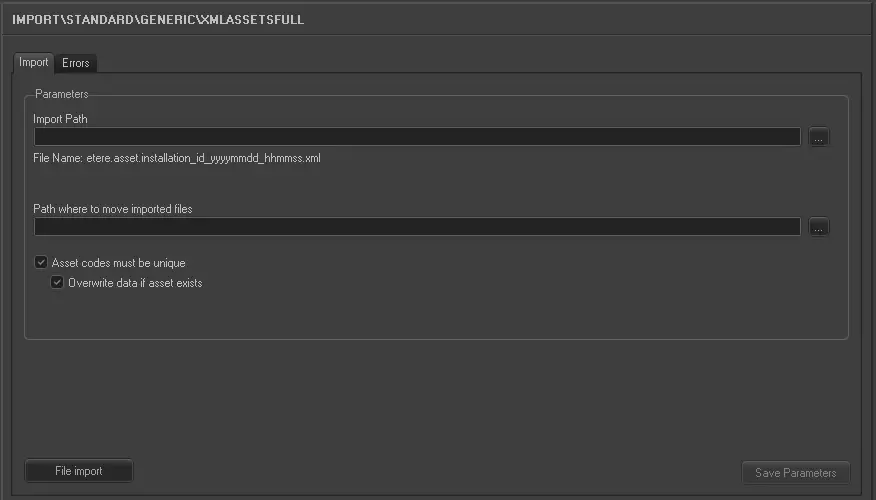 5215_Import_standard_generic_xml_asset_full