84.2.4.14 Passthru
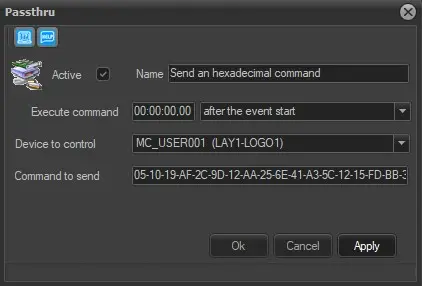
The Passthru secondary event permits to send custom hexadecimal commands to a certain device (e.g.: logo generator, subtitler, crawl generator, router, master control, etc), it requires the following parameters to be specified:
4950_Passthru
Active: Check this parameter to enable the secondary event, leave it unchecked to disable it.
Name: Give it a brief descriptive name.
Icon: Make double-click on the default icon to change it with a more suitable one.
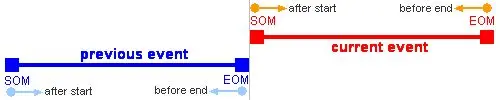
Execute command: Set the time at which the secondary event will send the command, possible values are:
4949_Execute-Stop_command
➢ After the event start: execute the command when the amount of time specified is passed, after the start time of the current main event (E.g.: If the main event starts at 15:00:00.00 and the time set here is 00:00:30.00, the command will be executed at 15:00:30.00).
➢ Before the event end: execute the command when remains the amount of time specified, before the end of the current main event (E.g.: If the main event ends at 15:00:00.00 and the time set here is 00:00:30.00, the command will be executed at 14:59:30.00).
➢ Before the previous event end: execute the command when remains the amount of time specified, before the end of the previous main event (E.g.: If the previous main event ends at 15:00:00.00 and the time set here is 00:00:30.00, the command will be executed at 14:59:30.00).
➢ After the previous event start: execute the command when the amount of time specified is passed, after the start time of the previous event (E.g.: If the previous main event starts at 15:00:00.00 and the time set here is 00:00:30.00, the command will be executed at 15:00:30.00).
NB: Please note that in case of using whether the "before the previous event end" or the "before the previous event end" timings; once the primary event is started, its secondary events' commands cannot be changed, that is, if the "preset" event changes and the command scheduled on the previous event is removed, the "take" event won't be changed (and the commands remains).
Device to control: Indicate which device the command will be sent to. In order to be displayed here, devices should be correctly configured under the Etere Configuration | Resources module, indicating that they will be used by an automation user.
Command to send: Enter the hexadecimal string to be sent to the selected device.
Practical example
With Passthru secondary event it's possible to, for example, preset a specific channel of the master control. By sending the following hexadecimal string:
FF 0B 03
and selecting the master control as device to control, will be possible to preset the channel 3. To preset a different channel, simply change the last 2 characters of the string (e.g.: FF 0B 04 to preset the channel 4).
 4949_Execute-Stop_command
 Passthru