79.2.1.1 Configure NCS Server
Etere allows communication between Newsroom devices such as Prompter or Graphic Generators and Etere Ecosystem by relying on the Etere Nunzio NCS module.
Etere Nunzio NCS module allow MOS Protocol messages exchange between Nunzio and MOS Devices, updating and delivering the Running Orders across all MOS devices in the Newsroom environment, while integrating every transaction within the Etere Ecosystem.
Only one NCS Server can be active for each station; however Etere allows a MAIN and BACKUP configuration of NCS Server which provide a complete full tolerance of the system.
From the NCS Server tree node, expand Mos Gateway > Settings > NCS Servers to view the given configured servers.
4014_ncs_server_list_new_version
Next, click the icon under Edit function to add a new NCS Server.
Edit function
In the NCS Server dialogue, enter a name to the ETERE PC parameter and click <OK> to create the new NCS Server.
You can also use the following shortcuts to expedite the process:
- Ctrl + N= New
- Ctrl + E=Edit
- Ctrl + S=Save
- Ctrl + Z=Undo
- Del key=Delete
In the NCS Server node, you can simply select any existing server and assign it as NCS Server using the "This PC is an NRCS Server" function in the Edit menu.
This PC is an NRCS Server
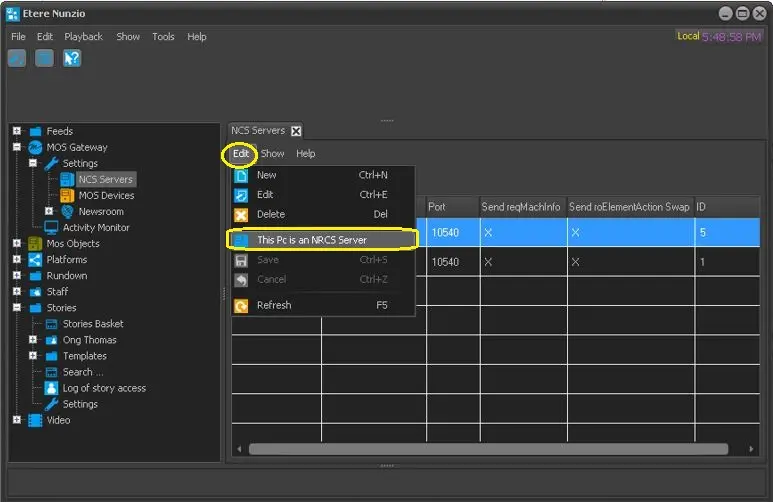 This_PC_is_an_NRCS_Server
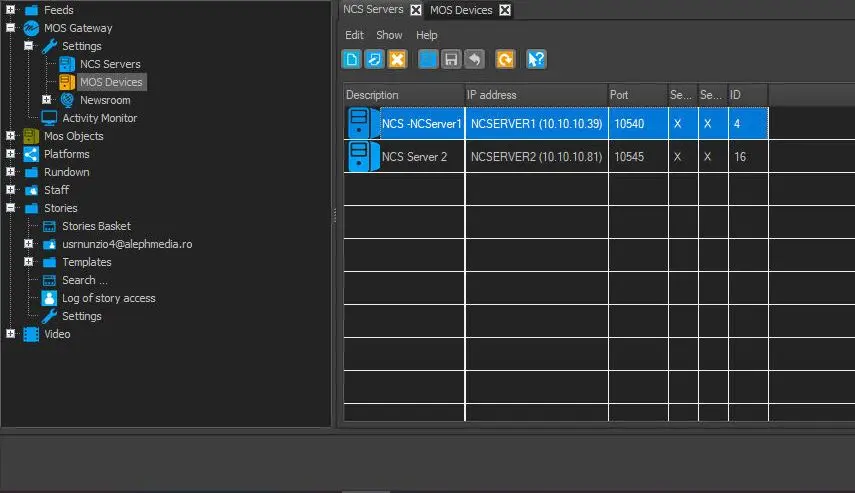 ncs_server_list_new_version
 ncs_server_nunzio_new_version