59.2.2.9 General
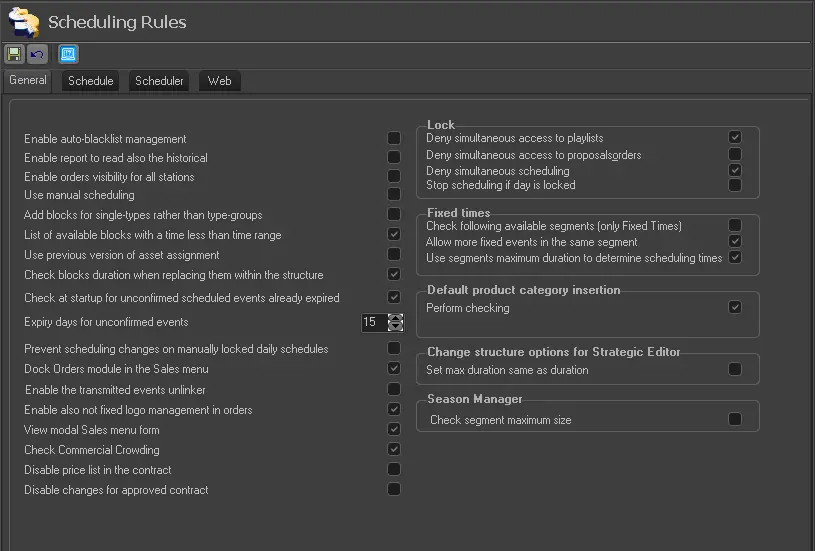
In General, all parameters regarding the basic behaviour of commercial schedules are listed below:
schedulingrules_general
BASIC PARAMETERS
Enable auto-blacklist management - If enabled, Etere Air Sales will automatically place all events which are either unable for being scheduled or have been removed from the schedule into the Black List. Refer to the W/B Lists > Automatic management chapter for more information.
NB: Please note that even if this parameter is disabled, Black and White lists will be available for manual management (see W/B Lists > Manual management).
Disabled (default)
Enable report also to read the historical - If enabled, besides data on the production database, Air Sales reports will include data stored in the historical database (set in Basic > System).
Enabled (default)
Enable orders visibility for all stations - Set the policy which order lines will be made available across multiple stations:
Disabled - If disabled, besides order/proposal lines from their input station, order/proposal lines from the station assigned to their lines.
Enabled - If enabled, besides order/proposal lines from their input station, order/proposal lines from any other stations would be available.
NB: Modifying orders lines from their input station (e.g. channel 01) is allowed to all users; instead, the "Sales Proposal\Lines_edit\Others_than_owner" right is required to enable users to modify from a different station (e.g. channel 03) all those lines assigned to said station (e.g. channel 03).
Disabled (default)
Use Manual Scheduling - If enabled, the manual scheduling features of Air Sales (i.e. the manual inserting module and the manual scheduling report, which are disabled by default) will be made available.
Disabled (default)
Add blocks for single-types rather than type-groups - If enabled, blocks available for proposals/orders schedule will include only those blocks with segments matching the order's specific type (e.g. sponsored spot); if disabled, all blocks with segments corresponding to the order's type group (e.g. commercials) would be included.
Disabled (default)
List of available blocks with a timeless than time range - If enabled, the list of blocks to be used for scheduling will contain ONLY those blocks whose times are lower than the scheduling time range.
.For example, if the scheduling time range goes from 08:00 to 09:00, and this option is enabled, only those comprised between the 08:00-08:59 interval will be listed; otherwise (if disabled), those blocks which start at the 09:00 will be included
Enabled (default)
Use the previous version of assets assignment - If enabled, the last version of the Assets Assignment function available for orders would be used.
Disabled (default)
Check blocks duration when replacing them within the structure - If enabled, the block replacement (from Weekly Schedule) would only be allowed if the replacement blocks have the same duration as replaced blocks.
Enabled (default)
Check at startup for unconfirmed scheduled events already expired. If enabled, every time Etere Air Sales starts up, it will check and delete all unconfirmed occurrences planned that have already reached their expiry date.
Enabled (default)
Expiry days for unconfirmed events - Set the number of days (after the insertion date) for which a space booked for an event will remain in the broadcast playlist (as unconfirmed) before being confirmed.
.If the is no confirmation received within the specified time, the booked event will be automatically removed from the broadcast playlist.
15 (default)
Prevent scheduling changes on manually locked daily schedules - If enabled, the deletion of locked events (proposal lines) from commercial playlists (from Strategic Editor) is not allowed.
.If disabled, it is allowed to delete events without "lock" restrictions.
Disabled (default)
Dock Orders module in the Sales menu - Enable the orders form to be docked into the air sales main window.
Otherwise, the order form will be docked in a new window.
Enabled (default)
Enable the transmitted events unlinked - This function unlinks a Commercial Spot tied to a particular contract line. Once unlinked, the commercial spot can be re-linked to another line within the same contract or link to another contract.
Enabled (default)
Enable also not fixed logo management in orders - Enable the logo management for contract lines that are not scheduled with fixed logo.
Enabled (default)
View modal Sales menu form - Enable to view the Sales menu in a modal form that disables the other main menu selection.
Enabled (default)
Disable changes for an approved contract - If set to enabled, only users with the Sales Supervisor rights is allowed to modify the schedule of approved orders.
Under the Scheduling rules, the following conditions apply:
•For users with Sales Supervisor rights, whether this option is enabled or disabled, users have "Full Access" rights to the proposals.
•For the account executive to view the approved proposals, the Web access rights "SalesAgent_Approved" must be active. Modification of approved proposals is not allowed.
Enabled (default)
LOCK
Deny simultaneous access to playlists - If enabled, simultaneous access to daily playlists from Strategic Editor won't be allowed.
Every time a user attempts to open a daily playlist currently in use by another user, a message will be displayed to indicate the locked status playlist and allow unlocking it (the user who was previously using the playlist will be notified about the locked status of the playlist).
Enabled (default)
Deny simultaneous access to proposals&orders - If enabled, users won't be allowed to open (through either the Sales or Orders modules) those orders which are currently open by another user.
Disabled (default)
Deny simultaneous scheduling - If enabled, it won't be possible to launch (through either the Air Sales Scheduler or Order modules) the scheduling of those order lines which another user is currently scheduling.
Enabled (default)
Stop scheduling if the day is locked - If enabled, the Air Sales Booking Server will interrupt the scheduling process of an order in case another user locks the scheduling target day.
Disabled (default)
FIXED TIMES
Check following available segments (only fixed times). Suppose the fixed time slot in which an event is intended to be scheduled is unavailable (e.g., due to prior scheduling or diverse scheduling structure). In that case, Etere Air Sales will schedule the event in the next available slot.
Disabled (default)
Allows more fixed events in the same segment - If selected (by default), fixed time-slots will be allowed to hold ONLY events scheduled using either the 'fixed time' or 'priority' methods.
Enabled (default)
Use segments maximum duration to determine scheduling times - If enabled, the maximum duration of segments will be considered their actual segment duration when placing events at fixed times; otherwise (if disabled), the scheduled duration will be considered.
It is suggested to disable this option in cases when scheduled. Maximum segment durations differ noticeably because when determining the segment on which an event (which fixed time is unavailable) should be placed, it will be the nearest one which ends time (i.e., start time + maximum/scheduled duration) doesn't exceed the expected fixed time.
For instance, if an event is intended to be scheduled all days at 12:00:00 and someday this time is not available (e.g., the segment doesn't exist). The immediate previous segment starts at 11:58. Still, it has a maximum/scheduled duration equal to three minutes; it won't be selected since its end time (11:58:00 + 00:03:00) exceeds the expected fixed time; instead, if a previous segment starts at the 11:55:00 and its maximum/scheduled duration is equal to 4 minutes it will be selected since its end time (11:55:00 + 00:04:00) doesn't exceed the expected fixed time.
Enabled (default)
DEFAULT PRODUCT CATEGORY INSERTION
Perform Checking - if enabled, Etere Air Sales won't allow the insertion of two or more commercials with the same product category (e.g. beer) inside the same segment; if disabled, this rule will be ignored.
Enabled (default)
CHANGE STRUCTURE OPTIONS
Set max. Duration same as duration - If enabled, the maximum duration of segments will be the same as the normal duration, thus avoiding overflow durations.
Disabled (default)
Season MANAGER
Check segment maximum size - if activated, the season will be scheduled, taking into account the maximum duration of segments instead of their scheduled duration.
Disabled
(default)
 schedulingrules_general