72.7.4.3 Crawl and script configuration
In case of using a ETX to automatically display subtitles for broadcasting events it will be necessary to configure the Crawl and Script to be used for sending subtitles to the ETX Logo, the configuration procedure is described below:
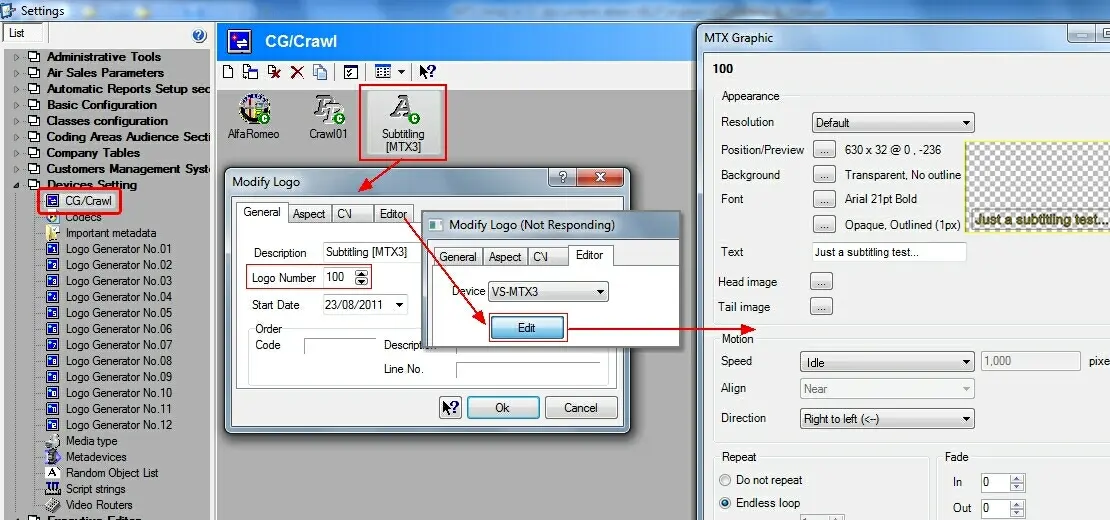
1.In Etere Configuration, under the CG/Crawl section, create a crawl featuring the following data:
CG Crawl
General tab
Description - Give a brief and descriptive name to the crawl.
Logo number - Indicate the code of the MTX text object to which the crawl is related.
Editor tab (for MTX devices only)
Device - Indicate the ETX server on which the text object is stored.
[Edit] - Create a new text object or edit an existing one in the ETX server, specifying the following key parameters:
▪Text (only for preview since it's replaced with the proper subtitles)
▪Font (select a medium size and a well-contracted color)
▪Position (should be placed in the bottom center of the screen)
▪Speed (must be idle to display a static text)
▪Repeat (must be set to endless loop to permanently display the text)
NB: Information on the MTX Editor can be found in the MTX Text Objects section of the MTX chapter.
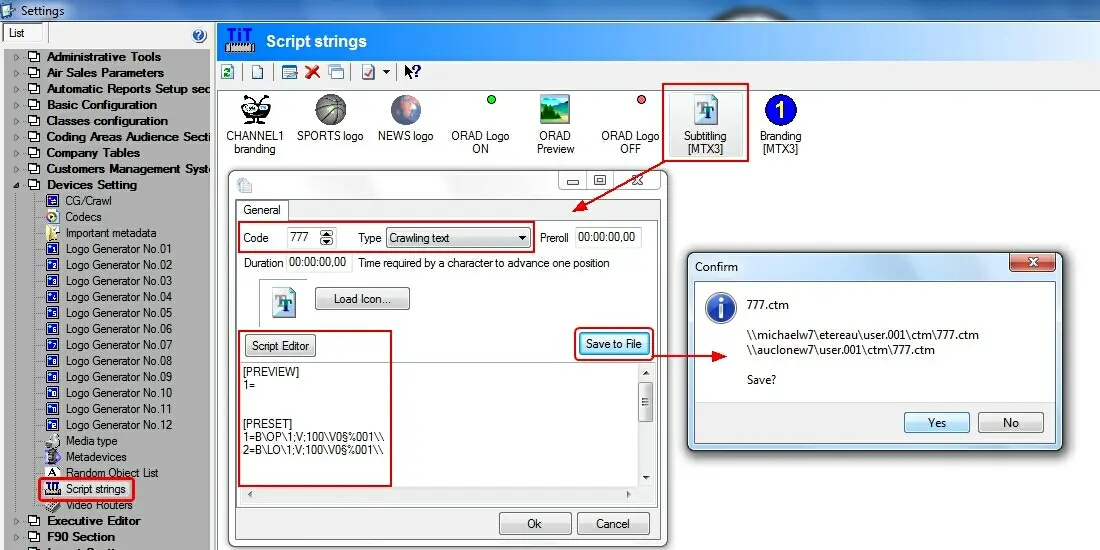
2.Under Etere Configuration, navigate to the Script Strings section and create a new script, then, compile its data as follows:
Script Strings
Code - 777
Type - Crawling text
[Script Editor] - Press this button and under the 'Raw file' tab paste the following text:
[PREVIEW]
1=
[PRESET]
1=B\OP\1;V;100\V0§%001\\
2=B\LO\1;V;100\V0§%001\\
[TAKE]
1=B\PL\1;V;100;%001\\
[PARAMETERS]
1=
[DESCRIPTION]
caption=SUBTITLE
where:
•OP : Open command
•LO : Load command
•PL : Play command
•1 : ETX Logo layer
•V : Variable
•100 : ETX text number
•V0 : Speed 0 (idle)
•%001 : Parameter (subtitle text)
NB: For detailed information on the commands supported by MTX servers please refer to Available protocol commands section of the MTX chapter.
[Save to file] - Use this button to save the compiled script as a .ctm file in the Etere data directory (e.g. c:\users\[user-name]\appdata\local\etere\user.001\ctm\).
NB: On Etere 22 or lower it may be necessary to manually copy the just created file to the Etere program directory (e.g. c:\program files\etere\) of the Etere STMan server.
 CG_Crawl
 Script_Strings