70.3.5.9 Operations Log
The Operations Log function, available under the tools menu provide the following functions:
Show
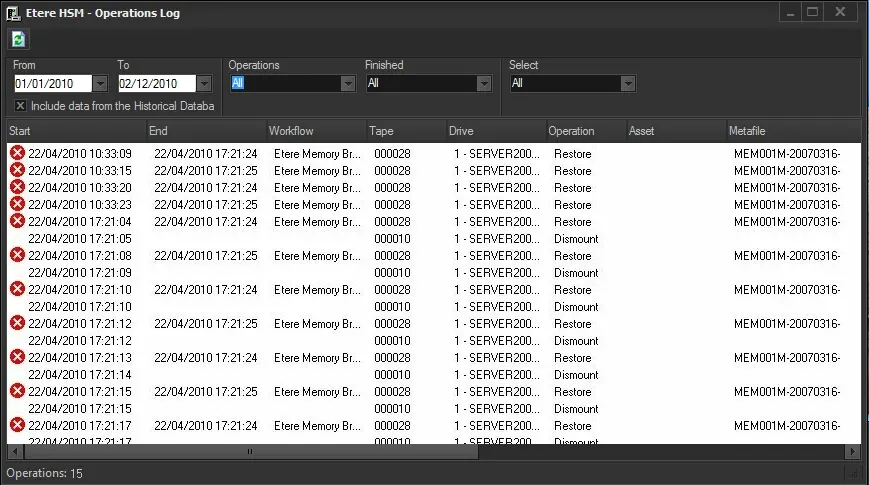
A detailed report of all operations processed by Etere HSM, providing the following filters:
Etere HSM - Operations Log
From - to - Indicate the period within which operations to be displayed have been performed.
Operations - Select to include all operations or only those related to data transfers or tape movements.
Finished - Narrow the status of displayed operations to all or only those finished successfully or failed.
NB: In case or operations retried because of errors, only their last station (success or failed) will be returned.
Select - Specify to show all operations or only those related to a certain tape, library or drive.
Maintenance
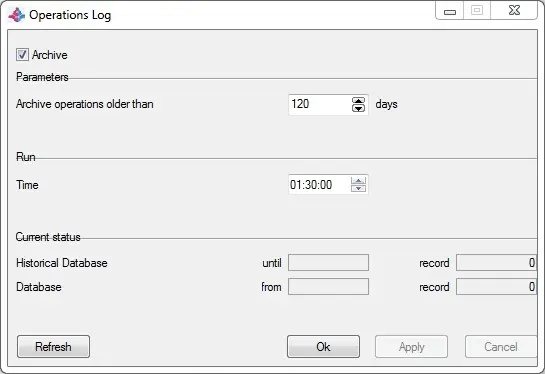
Set here the policies to be used for archiving logs, in this way only mos recent logs will be immediately available whereas those with a certain age will be stored on the archive. Available parameters include:
Operations Log
•Archive: if enabled, logs matching the parameters set in this form will be archived by Etere HSM.
•Archive operations older than: Specify the age that files must have in older to be archived.
•Run time: Indicate the time at which the archive operation will b performed.
•Historical database & Database: It show the actual status of the logs archived in both, the historical and the main database, that is, it will display the date of the last archived log and the number of archived logs (records).
Report
Display a list containing all archiving operations related to memory files and performed at a certain date:
 Etere_HSM_-_Operations_Log
 Operations_Log