59.3.9.2 Template Based Actions
Template Actions comprise all the actions which are created through a friendly wizard; actions made in this section can be related to any of the actions used within T-workflows, and that includes asset actions (e.g. check existence, check length), media actions (e.g. hsm archive, retrieve from device), recording actions (e.g. SDI copy), system actions (e.g. send email, retry, delay) and T-workflow actions (e.g. remote T-workflow, attach T-workflow).
Under this section, there are also present all system default actions, that is, those actions created by default by Etere; these actions should not be modified as they control principle operations that make up the broadcasting system. If it is needed to modify a system action, we suggest you contact our customer support service since system actions are sensitive tasks.
Searching for actions
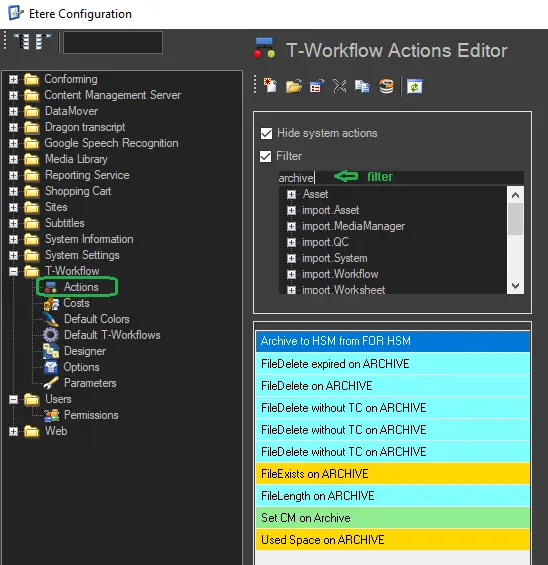
Each time you access the 'Actions' section, you can quickly locate existing actions by using any of the following three options supported by the application:
Actions
•Hide system actions: If checked, all system actions (i.e., actions created automatically by Etere) will not be shown on the list below,
•Filter: It gives the possibility of filtering actions by their type; this, just by clicking on a specific style in the three-view area,
•Typing filter: Enter any keyword(s) on the text box, and only those actions whose name contain it will be shown (see figure above).
Managing actions
Template-based Actions can be created using the T-Workflow Actions Editor, which, through a simple user interface, allows the creation of T-workflow actions quickly. To create a predefined action, perform any of the following methods:
New empty action - Create a new empty action to be defined by the user.
Predefined action - Create a new predefined action according to a template.
Duplicated action - Create a new action from an existing action.
 Actions