59.3.13.10 Technicolor Scheduall Integration
The Technicolor’s ScheduALL Integration enables ScheduALL to populate metadata into mapped MAM metadata fields and allows MAM metadata to be populated into the ScheduALL asset metadata database. In addition, it will allow comparison and T-workflow decisions to be automated based on ScheduALL vs MAM metadata.
Technicolor_Scheduall_Integration
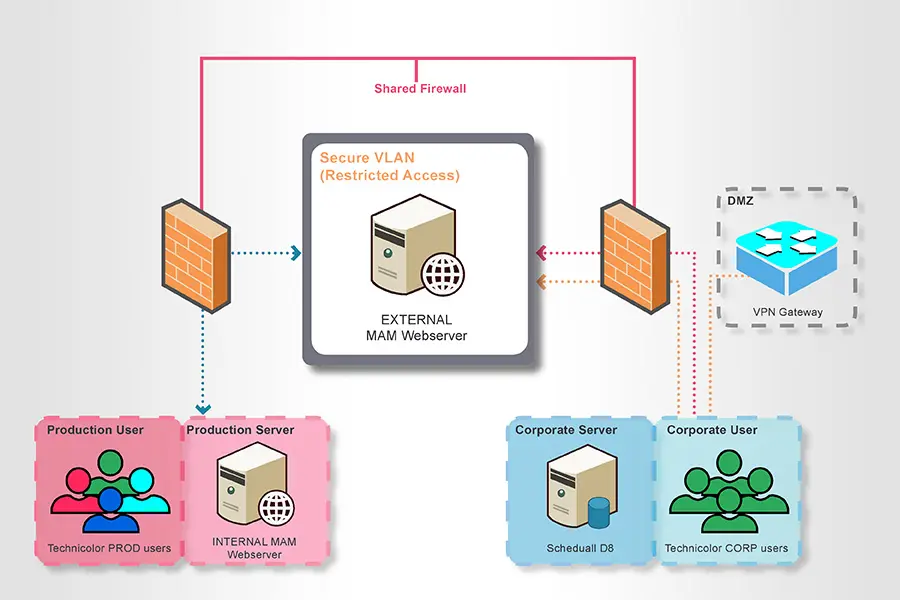
In the diagram illustrated above, the following functions are available:
•MAM can query the ScheduALL database for an asset and retrieve relevant metadata from ScheduALL
•MAM can compare received metadata with internal MAM metadata.
•Action T-workflow path decisions are based on an external vs. internal metadata comparison result. For if <Standard> does not match (i.e. is HD vs SD), then proceed to CST User Task (as documented in Specification)
•MAM will automatically update ScheduALL asset metadata. E.g. populate or update a <QC Status> field with relevant status values, detailed in Metadata Specification doc V2 on the ‘ScheduALL Fields’ tab. A ScheduALL field could be updated multiple times throughout a single MAM T-workflow (See reference T-workflow documents)
NB: To prevent connections from piling up when accessing Etere MAM via web services, the connection timeout is set at 3 seconds.
 Technicolor_Scheduall_Integration