59.3.9.81 Send eMail using dbMail
Action Description
The "Send email using dbMail" template allows you to configure an action for sending email notifications at any instance of the T-workflow through the email profiles of the MS SQL Server.
NB: This action is based on existing email profiles; if the profile doesn't exist in the MS SQL Server, the T-workflow action results in a fault.
Action Parameters
To create a new predefined 'send mail' action, just select the recent action in the Editor section and select 'Send email using db-mail' from the predefined template list.
Parameters
Name - The name of the person who is sending the email.
Profile Name - Enter the name of the SQL Email Profile for sending the email (see How to create an email profile in SQL).
To - The email of a person to whom the mail is directed.
NB: Multiple addresses can be entered separated by a semicolon (;).
CC - Send a carbon copy of the email showing the email address in the recipient list.
NB: Multiple addresses can be entered separated by a semicolon (;).
BCC - Sends a blind carbon copy of the email message to a recipient whose email address won't appear in the message.
NB: Multiple addresses can be entered separated by a semicolon (;).
Subject - The keywords about the argument will be discussed in the email. Please note that the Description and Code of the asset will be automatically appended to the subject, for instance:
T-workflow notify [Assed Id:1735, Code:Simpsons-3S-Ep11]
Text - Detail here the body content of the email.
Attach file(s) of codec - If you want to attach a file, you can specify its codec here.
Attach file(s) of device - Specifies the device from where the attached file will be taken.
SendMain procedure - Indicate the system-stored procedure for sending notifications, the default one (wf_user_dbmail_execute) or the customer-specific ones.
The email "wf_user_tapelessReception_dbmail_execute" sends an email containing ID, Code, Title and Duration information.
Important Note:
If the stored procedure "wf_user_tapelessReception_dbmail_execute" is used to send a notification email, the recipient specified in the CC parameter will not receive the email. Instead, the copy of the email will sent to recipients listed in the <Supplier> parameter in the Tapeless Reception tab in Media Library.
After filling out this form, the action will be created, and it can be manually adjusted in the following XML data field ('Custom Data' tab), which contains all the previously entered data just by changing the text that follows each of the 'value =' sections:
Custom_Data_tab
How to use it
Once created and configured, the email action can send messages from any T-workflow.
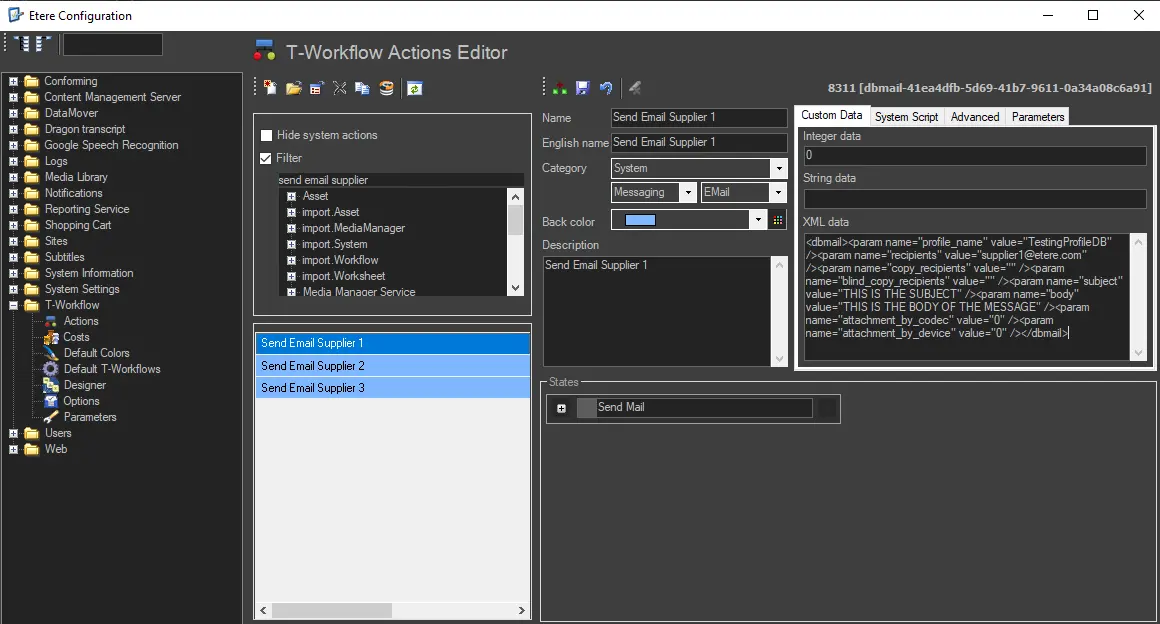 Custom_data_tab