84.4.5.7 STANDARD > EVS PLAYLIST XML
Import Scope
The import EVS Playlist XML import an XML file containing one day schedule.
Import Parameters
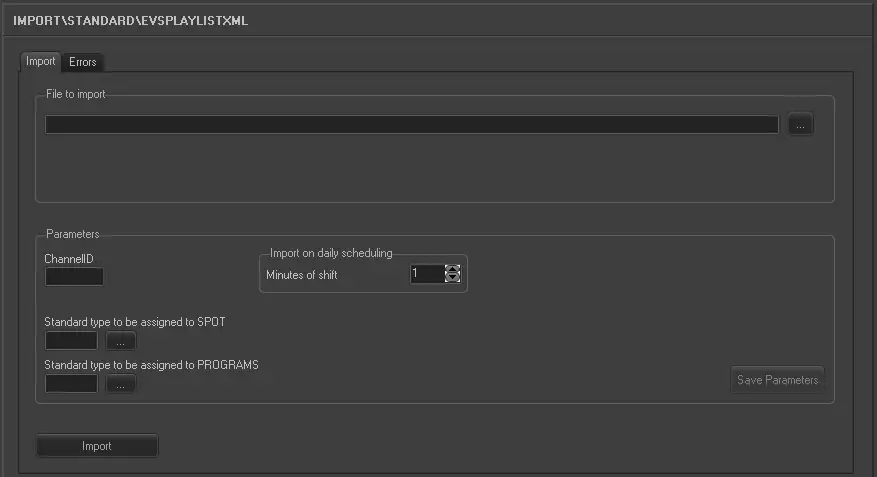
Import_standard_evs_playlist_xml
File to import
Specify the name of the XML file to be import. The file name format must be “yyyy_mm_dd_Channel ID_xxx.xml (e.g. 2017_07_12_0089_4.xml).
You can click on the browse button to locate the XML file in network drive.
Parameter
•Channel ID: Specify the channel ID assigned to the user. The Channel ID must composed of 4 characters.
•Standard type to be assigned to SPOT: Click the browse button to select the asset type to be assigned to SPOT. If the asset is not presented in Etere, specify the asset type in the text box.
•Standard type to be assigned to PROGRAMS: Click the browse button to select the asset type to be assigned to PROGRAMS. If the asset is not presented in Etere, specify the asset type in the text box.
Import on daily scheduling
•Minutes of shift: If the XML file is to be import on current date, specify the minutes between imports.
Click the <Save Parameter> to confirm the parameters settings.
Before import, the following verifications would be performed:
•File name must contain a valid date.
•The Channel ID in the filename matched the Channel ID in XML.
•The XML file contain valid structure.
•For SPOT, the Etere code is taken from the VarID attribute of the <ClipInfo> tag. If the asset does not exist, new asset would be created.
•For PROGRAMS, since there is only one title in the file, an asset with that title is searched in Eter
Launch the Import
Once the XML file has been locate, click the <Import> button to start the import process.
 5205_Import_standard_evs_playlist_xml