59.2.17 Flexi-metadata Mapping
The Flexi-metadata Mapping section allows to set the relationship between the field of an asset and its Flexi-metadata; these relationships enabled Etere to automatically populate all associated metadata fields by retrieving their values from the related Flexi-metadata.
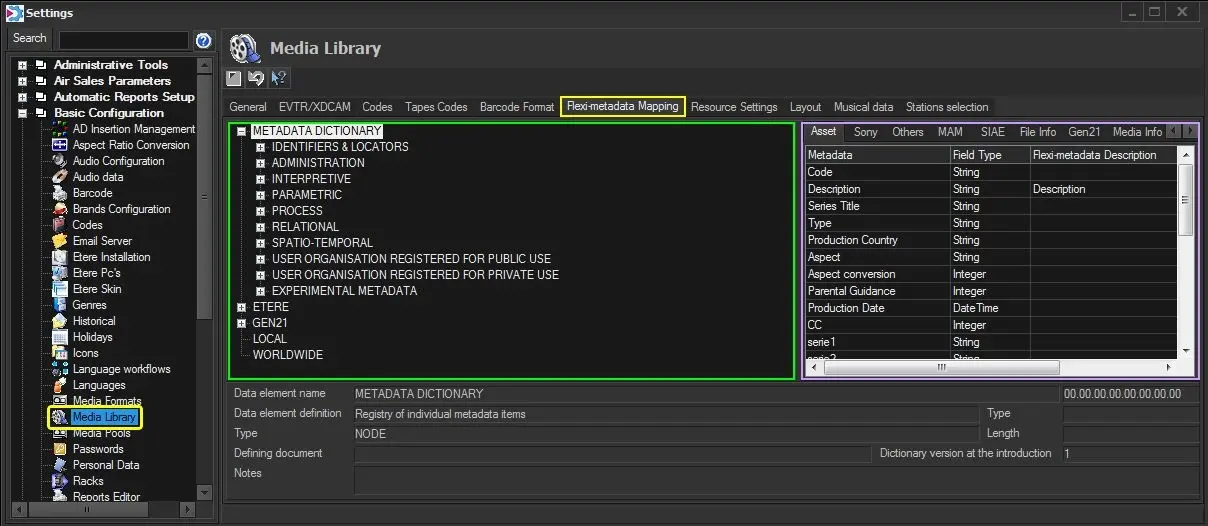
As shown in the figure below, the user interface is mainly divided into two areas:
Flexi-metadata Mapping
Flexi-metadata - Located at the left panel, this tree folder contains the default and customised Flexi-metadata defined by the station (see MAM > Flexi-metadata). Additionally, the bottom of the window displayed all key information related to the current selected Flexi-metadata element (e.g. name, definition, type, etc.).
Etere metadata - Displayed in the right panel contains the various metadata managed by Etere (see Media Library > Etere metadata). Each tab (i.e. Asset, Sony, MAM, SIAE, FileInfo, Gen21, MediaInfo, Others, etc.) includes a series of metadata featuring the following properties:
Metadata - Name of the metadata managed by Etere.
Field type - Type of information in metadata (e.g. string, date-time, integer, etc.).
Flexi-metadata Description - Flexi-metadata to which the Etere fields are linked, from which it will automatically retrieve its value.
Flexi-metadata Item - The unique identifier for the flexi-metadata to which Etere fields are linked (E.g.: 0F.01.0C.02.01.00.00.00)
See also:
Etere metadata
Link Flexi-metadata to ETERE fields
 Flexi-metadata_Mapping