70.3.8.6 Catalogue tab
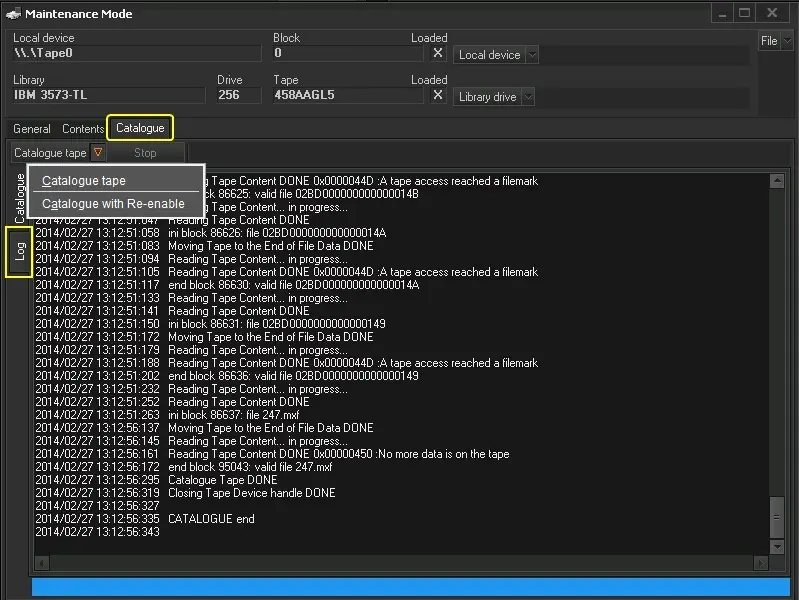
The Catalogue tab is related to the recatalogue of the cartridge content with the following available functions:
Maintenance Mode 1
• Catalogue Tape: This function performs the "recatalogue" of a cartridge, reads the cartridge content and corrects the data present in the Etere database with the actual content (it DOESN'T do the opposite: reading the database and correcting the data in the tape).
• Catalogue with Re-enable: When this function is selected, upon recatalogue, the Data Pump would re-enable and rehabilitate the files that logically detected from the database, if the files are not already archived in the same mediapool.
Note: If a CRC error is found on cartridges, content will be read up to the point where the error occurred.
The recatalogue function is useful to rectify the inconsistencies between the files on tape and the Etere database:
- It reads the content from the tape and updates the database.
- If a file is stored on tape but it is not linked to an asset in the database, the file would be linked.
• Stop: Interrupts the "catalogue" process properly without waiting for its completion.
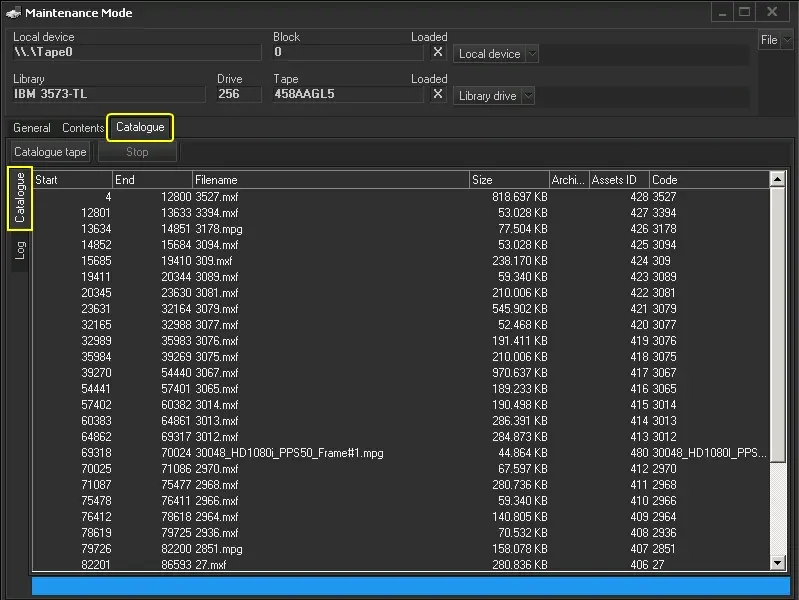
Once catalogued, the cartridge content will be displayed:
Maintenance Mode 2
 Maintenance_Mode_1
 Maintenance_Mode_2