69.1.4 Configure Data File Transfer via FTP
The Data for the file transfer via FTP function in each export process, enable you to export the file to an external agency. You must define the file transfer parameters to fulfill the transmission.
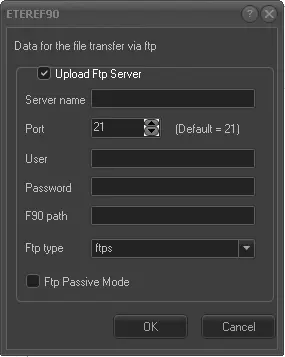
Data_for_the_file_transfer_via_FTP
Upload FTP Server: Enable this option to define the file transfer parameters for uploading to FTP server.
Server name: Specify the FTP address of the FTP server, e.g. ftp://195.120.230.35
Port: Specify the network port number to be used. The default port is 21.
User: The login user name to connect to the server.
Password: The password to authenticate the login user name.
F90 path: The path in the FTP server where the file would be stored (e.g. /ImportedSchedules/).
FTP type: Select one of the file transfer protocol to execute the transmission, e.g. FTP, FTPS, or SFTP.
If this parameter is not set, e.g. it is launched after an initial install or update, the setting in global option “FORCE FTP NO_SSL” would be applied. If the option is enabled, the transfer protocol would be set to FTP. If option is disabled, the transfer protocol would be FTPS.
FTP Passive Mode: Uncheck this option to perform a secure connection to the server.
 Data_for_the_file_transfer_via_FTP