59.3.4.10 Users Grouping
The "Users Grouping" section, available in Etere Configuration, allows defining the supervisors that can access the shopping carts of a particular group of users.
To create supervisor groups, follow the procedure below:
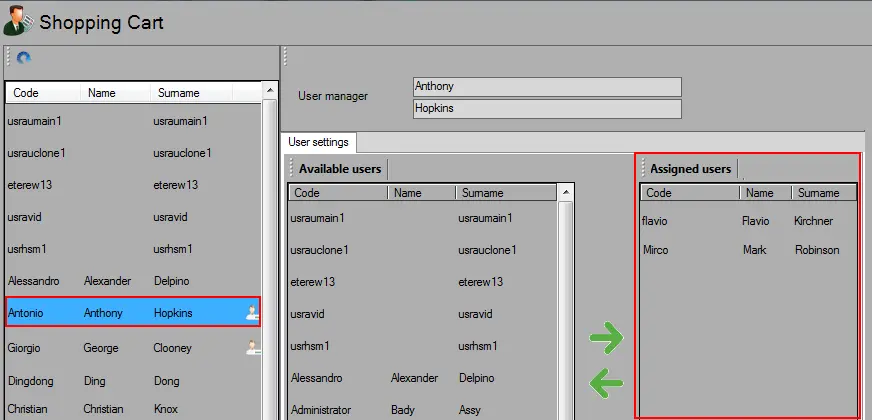
create_supervisor_groups
1. In the left panel, select the supervisor (e.g. Antonio Hopkins).
2. Select a user (e.g. Flavio Kirchner) from the "Available users" in the central panel and press the -> right button to move it to the "Assigned users" in the right panel; it would assign the user as selected supervisor. Repeat these steps to assign more users to the supervisor's group.
3. Once a supervisor has been assigned to at least one user, he will be identified with the SC_Settings_11 icon.
4. Users can be removed from supervisor groups by pressing the <- left button to revert the assignment.
5. At this point, supervisors can access and monitor shopping carts created by their assigned users.
 create_supervisor_groups