59.5 Reporting Services
Etere Reporting Services provides an intuitive reporting environment to empower users to have an enterprise reporting environment enhanced with an unlimited number of custom reports; it permits messages to be efficiently designed and accurately managed through a reporting engine that allows to preview, print and export any information under a user-friendly user interface.
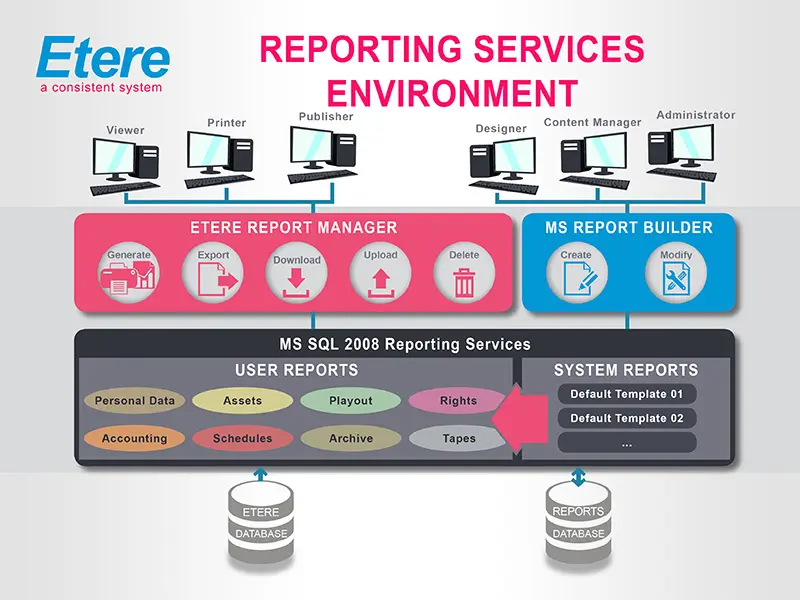
Etere Reporting Services integrates a dedicated reports database with the central system database, thus improving the reliability and performance of the system since all reports (and their settings and snapshots) are stored in a dedicated server, just as shown in the figure below:
Reporting Services
Etere Reporting Services is based on the SQL Server 2008 Reporting Services technology that leverages all key features of a web-based reporting server focused on simplifying the process of creating and editing reports by including the following features:
•User-friendly interface, composed of easy-to-use wizards for creating table and chart data regions,
•Ensured validity, report connections using custom data sources to allow it to work even if the database is changed, upgraded, replaced, or otherwise modified,
•Modify existing reports, customize and update reports by directly opening and editing reports stored on the report server,
•Interactive reports, add interactive features such as document maps, show/hide buttons, and drill-through links to sub-reports and drill-through reports,
•Presentation formats: choose a presentation format (e.g., HTML, PDF, XML, CSV, XLS, doc, etc.) when you open the report or after you open the report,
•Images, embed or reference images and other resources, including external content,
•Charts, summarize data in a visual format, and present large volumes of aggregated information at a glance,
•Subscriptions: once a report is published, it is possible to configure it to run at a specific time, create a report history, and set up e-mail subscriptions.
Export Report
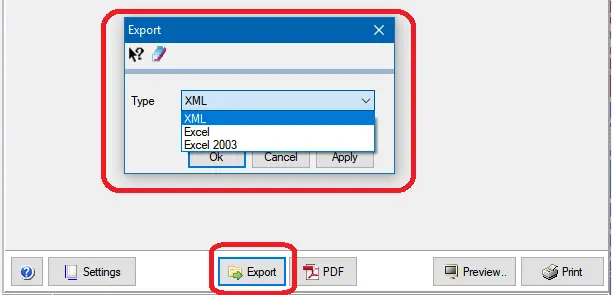
In all the available reports in the Etere Report Repository, by clicking on the "Export" button at the bottom of each report, you can select the type of output file you wish to export for the selected report.
Export Report
•XML: Select this option to export the report into a "plain-text" XML format file.
•Excel: Select this option to export the report in native Excel. Open XML or XLSX format.
•Excel 2003: This option exports the report to an Excel 2003 spreadsheet used in Microsoft Office Suite.
 Reporting_Services
 Export_Report