59.3.7.1 Counters
The System Information Service
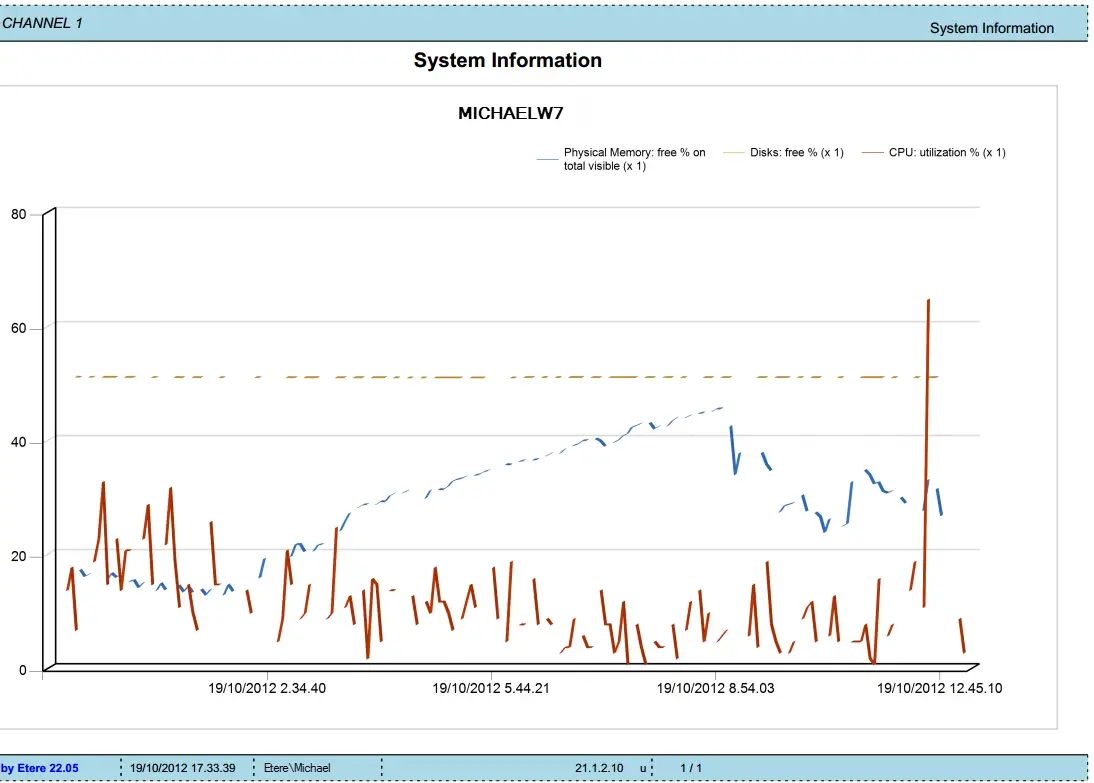
The System Information service provides management information about operating systems, devices, applications, and services of all Etere workstations in the network, capable of sending alarms (SNMP messages) in case gathered values are outside the allowable ranges. This service is based on the WMI service of each workstation, which collects data such as CPU utilization, DISK free space, and unused MEMORY, among others.
NB: It's important to note that some counters are specific to operating systems; therefore, they may not be retrieved.
Service requisites
To ensure the correct functioning of the System Information service, the following requisites must be accomplished:
❖The pingable property of monitored computers must be enabled (see pingable property).
❖The Windows Management Instrumentation (WMI) service must run on all monitored computers.
❖Monitoring Console's users must have access permissions to all monitored computers.
Monitoring of counters
The System Information service forms part of the Monitoring Console, displayed in the status bar under the "collect and check PC counters" area.
3727_Monitoring_Console
Moreover, gathered information will be available through the detailed Etere Reports > Resources Manager > System Information report:
System_Information_report
Service Configuration
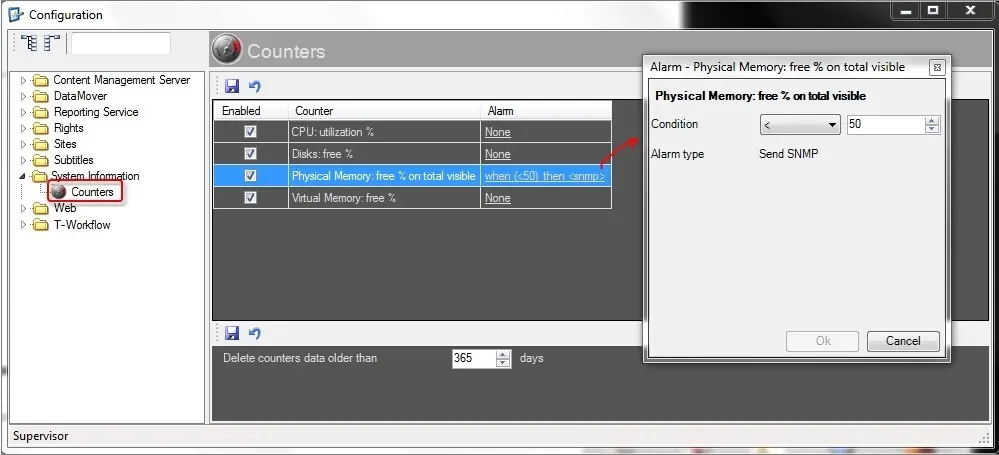
The counters enabled for being monitored by the System Information service are set in this section, making it possible to select the counters (e.g. CPU utilization) as well as the alarms (e.g. SNMP message) to be sent in certain conditions (e.g. value greater than 75%).
To activate and configure a specific counter, click on its "alarm" field and set the following parameters:
specific_counter-alarm
Enabled - Indicates if the counter should be monitored or not.
Counter - Displays the description of the counter (e.g. CPU utilization, Disk free, Physical Memory free, etc).
Alarm - Indicates the alarm type (i.e. send an SNMP message) to be triggered and the condition that must be verified.
In the bottom part of this section, it will be possible to set the maximum number of days collected data should be kept in the system database by adequately setting the "delete counters data older than" parameter.
Adding counters
Default counters are automatically loaded into the database through the system maintenance. More counters can be easily added by inserting them into the 001SI_COUNTER table of the default.mdb database stored in the Etere installation directory (e.g. c:\program files (x86)\etere\):
default.mdb_database
 System_Information_report
 specific_counter-alarm
 default.mdb_database