54.8.3.2 Commissions
What is a Account Executive?
An Account Executive is the person who directly represents the station in commercial transactions with clients, the Account Executive takes orders from customers and provide them with solutions. An Account Executive is a entity which have the 'Account Executive' option enabled on its personal data form; salesmen can be associated to one or more customers and vice versa.
Defining Commissions
In the Personal Data module, by clicking on the Commissions button located in the toolbar, the user will be able to set commissions that salesmen will receive for its interaction with certain clients. To assign commissions, just follow the next procedure:
1.Click on the search button and select the Account Executive for who you intend to assign them:
Configuration_personaldata_agent01
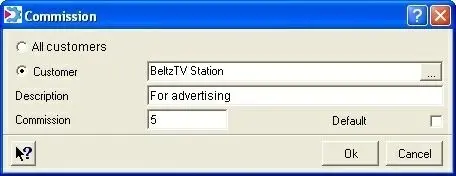
2.Once selected, all existing customers associated to the current Account Executive will be listed in the bottom section. To specify a new commission, right-click and hit the 'enter' option,a window will enable you to assign a commission for:
•All clients: A general commission that will be valid for all clients.
•Customer: The entered commission will be valid only for the specified customer.
Configuration_personaldata_agent03
3.It will be possible to insert a brief description for the current commission, as well as the commission value itself. By uncheck the 'Default' option, the current commission will be the one used by default in case various commissions have been specified for the same customer. After all these fields are compiled, click on the 'OK' button to finish the insertion:
Configuration_personaldata_agent04
4.Repeat the previous steps to continue defining more commissions for either the current or another Account Executive.
NB: Once defined, salesmen and their relative commissions are properly assigned to customers under the Invoicing Data tab, more specifically, in the 'Account Executive' field.
 Configuration_personaldata_agent01
 Configuration_personaldata_agent04
 Configuration_personaldata_agent03