New Season
9.3.2.5 Episodes tab
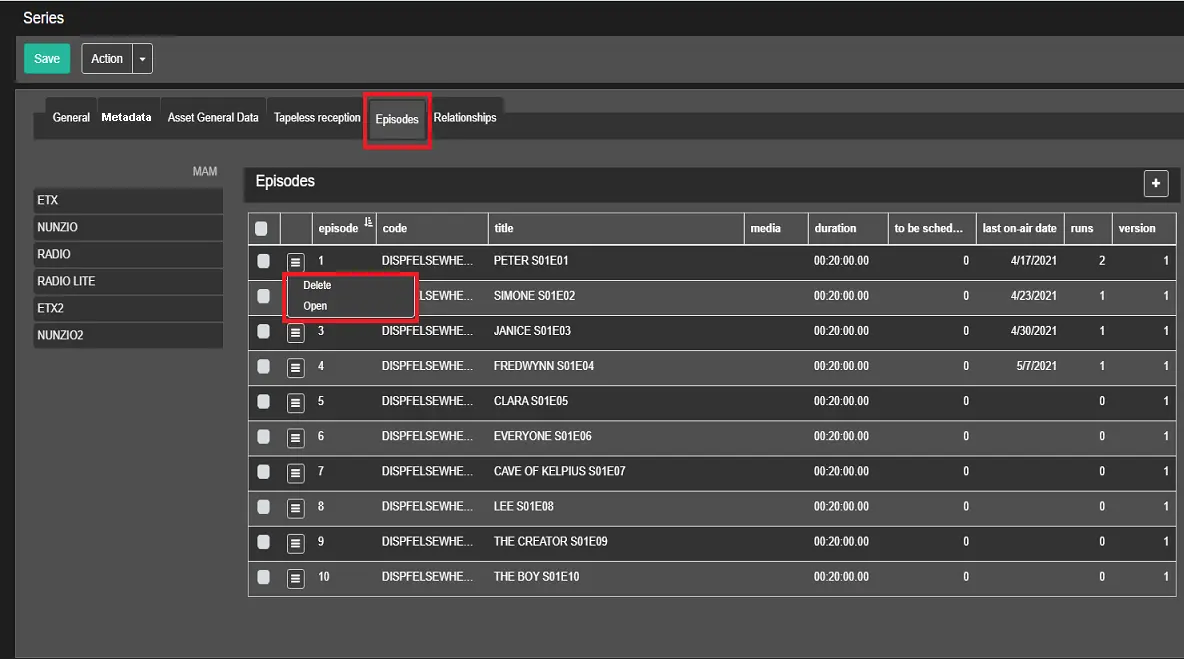
You can view and create episodes that make up the season in the Episodes tab.
Episodes_tab
- Episode: Progressive episode number;
- Code: The asset code related to the episode;
- Title: The title of the episode. If the episodes' titles are generated using a prefix, a sequential number indicating the episode number will be displayed;
- Media: If there is a media file associated with the episode, an icon will be displayed;
- Duration: The scheduled duration of the episode;
- To be scheduled: It indicates the total number of runs minus the number of already-broadcast runs number;
- Last on-air date: It indicates the previous on-air date of the episode;
- Runs: The total number of runs that are broadcast for the episode;
- Version: Specify the version of the episode if the episode has different versions;
Please note that the episode code and number are the same between versions.
If you wish to modify the episode, left-click on the episode area name and select the available action, as indicated in the above image.
- Open: Open the asset related to the selected episode.
- Delete: Delete the episode from the list.
Placed on the right, above the episodes table, the following buttons are available:
- Add: Open the form that allows to define how many episodes should be added, a prefix for each asset code and each asset title, the multilanguage for the asset titles and some other options.
- View/Hide expired episode: Allows to show or hide the expired episodes, which are hidden by default. When displayed, the expired episodes are written in red.
- Remove: This button appears only when at least an episode is selected through its checkbox. It allows to remove the selected episodes.
Note: In Etere there are some cases when an asset cannot be deleted and Etere, when the user is attempting to delete an asset, makes some internal checks to verify if the following circumstances exist:
- The asset is part of a contract
- The asset is linked to other assets
- The asset contains costs related to the tasks
- The asset is programmed in the historical database (e.g. the asset is featured in an archived on-air playlist)
- The asset has already been scheduled.
- The asset contains video files
If at least one of the above conditions is met, the deletion of the episodes will be denied and the user will be warned with an error message.
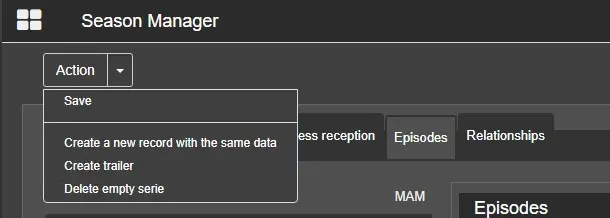
- Save: Save the changes applied to the episodes;
- Create a new record with the same data: Create a new season by copying some of the data from the current season;
- Create trailer: Create a promo for the current season and link it to the Relationships tab.
- Delete empty serie: This option appears only if the season doesn't have any episode and allows to delete the season.
Note: This options deletes also the linked trailer, if present.
ACTION MENU
Action_Menu
 Episodes_tab
 Action_Menu