72.7.3.5 Handling ARIB B24 Subtitles in ETX CC Inserter
This section describe handling of ARIB B24 subtitles in ETX CC Inserter, the ARIB B24 standard defines character encoding for use in Japanese-language broadcasting, it includes a number of extended characters not found in the base standards.
In ETX CC Inserter, handling of ARIB B24 subtitles is configured by generating a transport stream made of ARIB B24 program only. The transport stream is sent to a multiplexer via UDP link. When multiplexer receive the transport stream it multiplex the transport stream with video and generate a new transport stream containing both video and ARIB B24 subtitles.
NB: To prevent multiple lines subtitles overlapping or missing from the screen, set the screen display resolution to "950 x 540" pixels to obtain good aspect ratio.
Configuring ARIB B24 Transport Stream in ETX CC Inserter
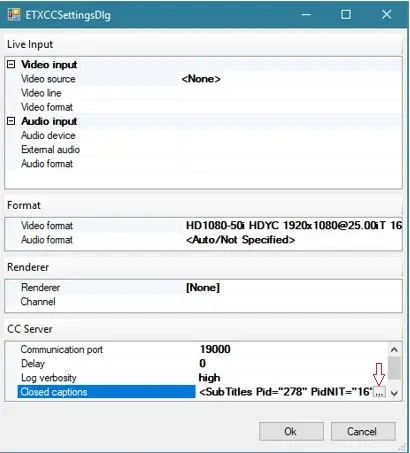
Launch the Resource Editor and follow the steps below to configure ARIB B24 transport stream properties in ETX CC Inserter.
arib_b24_configuration
•Video input/output: Refer to ETX CC Server settings.
•Communication Port: Specify port number as 19000 for UDP link.
•Delay: Specify the delay (in millisecond) to broadcast subtitles when playing video file.
•Log verbosity: Select the log verbosity level to capture the log messages.
•Closed Captions: Click on the browse icon at extreme right to launch the Closed Captions properties settings.
mam_arib_main_backup
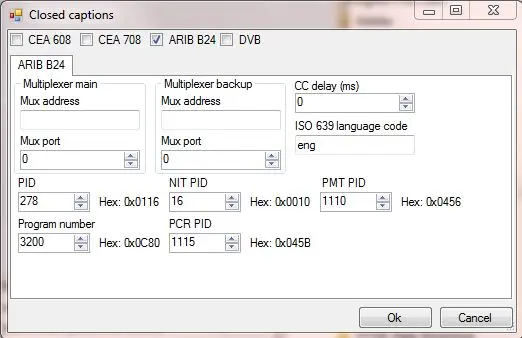
From the top section, enable “ARIB B24” to display all the related properties setting:
Multiplexer Main:
•Mux address: Specify the IP address of the Main Multiplexer receiving the ARIB B24 transport stream via UDP.
•Mux port: The port number used by UDP to send the ARIB B24 transport stream to Main multiplexer.
Multiplexer Backup:
•Mux address: Specify the IP address of the Backup Multiplexer that would resume the role of Main Multiplexer to receive the ARIB B24 transport stream in the event when primary Main Multiplexer is down.
•Mux port: The port number used by UDP to send the ARIB B24 transport stream to the Backup multiplexer.
Others:
•CC delay (ms): Specify the delay (in millisecond) in synchronizing the subtitles and video file.
•ISO 639 language code: Enter the 3 letter code of International Standard for language code to be used in subtitles, e.g. ita (Italian), eng (English), zho (Chinese), fra (French), etc.
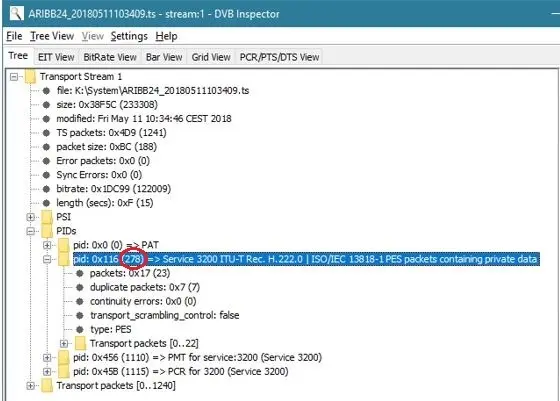
•PID: Enter the ARIB B24 PID generated from the transport stream. The subtitles transport stream consists of a sequence of packets of one or more elementary stream multiplexed into one common stream. All packets are tagged with a PID.
arib_b24_configuration_pid
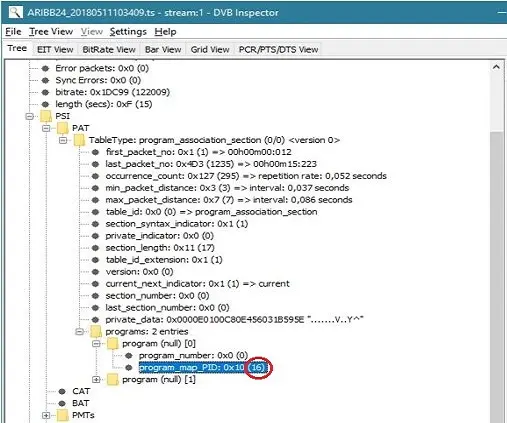
•NIT PID: Enter the ARIB B24 Network Information Table PID (NIT PID) generated from the transport stream. NIT provides a grouping of Transport Stream and the relevant tuning information.
arib_b24_configuration_nit_pid
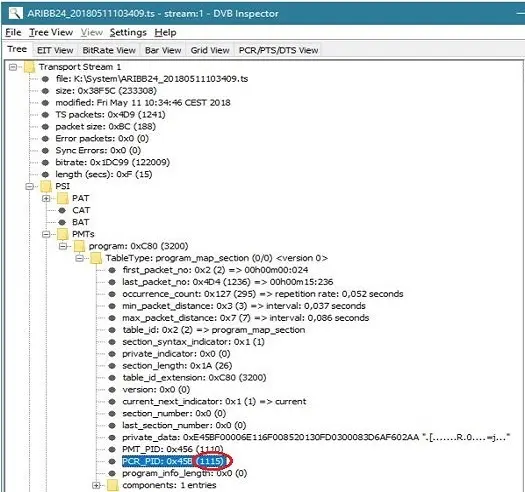
•PCR PID: Enter the Program Clock Reference (PCR PID) associated in the PMT. The PCR value is used to generate a "system_timing_clock" in the decoder to provide a highly accurate time base that used to synchronize audio and video elementary stream.
arib_b24_configuration_pcr_pid
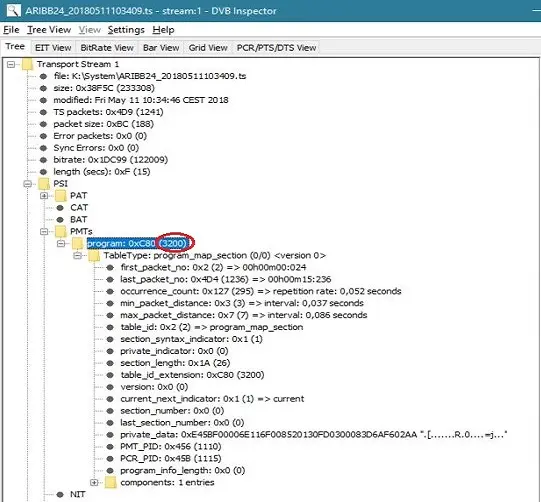
•Program Number: The program number generated from the transport stream. In the program association table (PAT) contains an index of all programs that present in the transport stream, all programs are assigned with program number (and PID) indicating where the program’s PMT can be found.
arib_b24_configuration_pgm_no
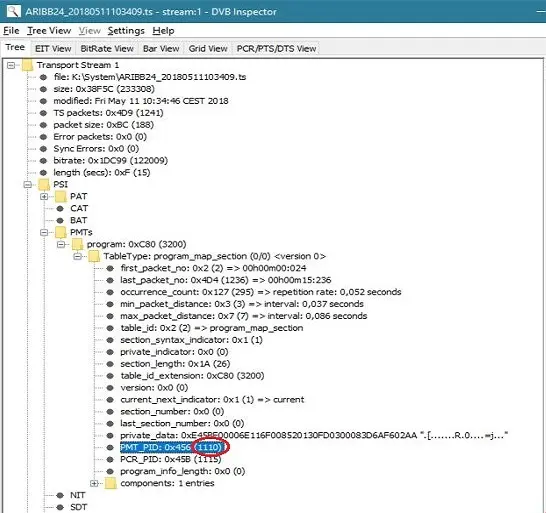
•PMT PID: Enter the Program Map Table (PMT PID) generated from the transport stream. The PMT is an index for an individual program indicating which elementary stream belong to the program, it contains general information for both elementary stream and the program.
arib_b24_configuration_pmt_pid
Click <OK> to confirm settings and exist from Resource Editor.
NB: The ARIB B24 subtitles transport stream is sent directly to the multiplexer via the UDP link, where CEA 608 and CEA 708 embed the subtitles into the video file with CC inserter, you would need to uncheck “CEA 608” and “CEA 708” when handling ARIB B24 subtitles.
NB: If the ETX CC inserter is configured to handle both CEA 608 and ARIB subtitles, when ARIB B24 subtitles is enabled and CEA 608 subtitles is presented in input video file, the conversion to ARIB would took place automatically. The CEA 608 subtitles would be passed to video output and convert to ARIB subtitles and sent directly to the multiplexer. The monitoring of ARIB transport stream would take place every one second.
•The conversion is only possible if Etere License EA1231 is installed and activated in station.
NB: With the enhanced Etere.MediaCore.dll (version 28.1.20.0 onwards), it would prevent video stopping when CEA 708 subtitle standard is not selected.
 mam_arib_main_backup
 arib_b24_configuration
 arib_b24_configuration_pgm_no
 arib_b24_configuration_nit_pid
 arib_b24_configuration_pmt_pid
 arib_b24_configuration_pid
 arib_b24_configuration_pcr_pid