Export Formats
84.4.4.87 CUSTOM > VTV MISSING ASSETS XML
Export scope
The "VTV Missing Assets XML" export allows generating an XML file containing data related to assets scheduled on a given period of time (in any station) but not yet ingested into the archive.
Prerequisites
Some exported tags are based on Flexi-metadata, which if compiled, will be exported as follows:
Flexi-metadata - TENCM
Flexi-metadata - MADVSX
Type : string
Flexi-metadata - TENDVSX
Type : string
Flexi-metadata - NGUOISX
Type : string
Flexi-metadata - DTNGUOISX
Type : string
Flexi-metadata - GHICHU
Type : string
Flexi-metadata - PRODUCTION_NOTE
Type : string
Flexi-metadata - Editor_Name
Type : string
Flexi-metadata - TRANGTHAI
Type : integer
Flexi-metadata - NGUOITH
Type : string
Flexi-metadata - NGAYTH
Type : datetime
Flexi-metadata - HTPS
Type : integer
Flexi-metadata - LUU
Type : integer
Flexi-metadata - KIEU
Type : integer
Flexi-metadata - DOHOA
Type : string
Flexi-metadata - KENHPS
Type : string
Flexi-metadata - DUYET
Type : boolean
Flexi-metadata - LUUTULIEU
Type : boolean
Flexi-metadata - NGUONTULIEU
Type : boolean
Flexi-metadata - QC
Type : boolean
Flexi-metadata - SOLANQC
Type : integer
NB: Flexi-metadata metadata is configured in "Configuration > Settings > MAM > Flexi-metadata" and compiled from "Media Library > Flexi-metadata".
Export process
Every transmitted event is exported within the <rowN> tag (e.g. <row1>, <row2>, etc.)
Files will be exported according to the following naming convention:
Missing_[version].xml (e.g. Missing_27)
where:
▪version : Global progressive counter of all-time exports
Export parameters
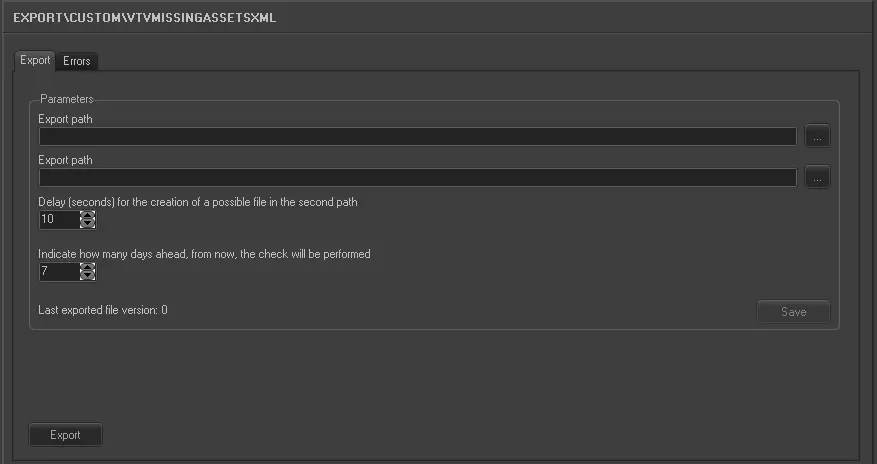
This export allows the following parameters to be set and then [saved]:
Export_custom_vtv_missing_assets_xml
Export_custom_vtv_missing_assets_xml
Export tab
Export path (1st path) - Browse for the primary path to export files for the current station
Export path (2nd path) - Browse for the secondary path to export files for the current station
Note: This export path is optional, it can be left blank.
Delay (seconds) for the creation of a possible file in the second path - In case of exporting files to a second destination, set here the time that should pass between the creation of the first copy and the second one.
Indicate how many days ahead from now, the check will be performed - Specify the future days to be included in the export, starting from the current date (i.e. 1), for all stations.
Last exported file version - Shows the progressive counter of all-time exports, from all stations.
Launch the export
Once all parameters have been correctly set, just press the <Export> button to launch the export operation.
Sample exported file
<rows>
<row1>
<First_scheduling>12/05/2014 07:01:28.11</First_scheduling>
<Code>121</Code>
<Description>One Hour</Description>
<Last_scheduled_action>12/05/2014 07:01:28.11</Last_scheduled_action>
<Run_amount>1</Run_amount>
<Duration>45212</Duration>
<COD_USER>1</COD_USER>
<TENCM>Qu?ng bá</TENCM>
<MADVSX> </MADVSX>
<TENDVSX> </TENDVSX>
<NGUOISX> </NGUOISX>
<DTNGUOISX> </DTNGUOISX>
<GHICHU> </GHICHU>
<PRODUCTION_NOTE> </PRODUCTION_NOTE>
<Editor_Name> </Editor_Name>
<TRANGTHAI>1</TRANGTHAI>
<NGUOITH> </NGUOITH>
<NGAYTH> </NGAYTH>
<HTPS>0</HTPS>
<LUU> </LUU>
<KIEU>1</KIEU>
<DOHOA> </DOHOA>
<KENHPS>VTV2</KENHPS>
<DUYET>1</DUYET>
<LUUTULIEU>True</LUUTULIEU> <NGUONTULIEU>True</NGUONTULIEU>
<QC>True</QC>
<SOLANQC>0</SOLANQC>
</row1>
<row2>
<First_scheduling>12/05/2014 08:37:35.14</First_scheduling>
<Code>130</Code> <Description>130_Promotion</Description>
<Last_scheduled_action>12/05/2014 09:08:05.17</Last_scheduled_action>
<Run_amount>2</Run_amount>
<Duration>4200</Duration>
<COD_USER>1</COD_USER>
<TENCM>Qu?ng bá</TENCM>
<MADVSX> </MADVSX>
...
<rows>
 5196_Export_custom_vtv_missing_assets_xml