72.7.4.11 Create a subtitles injection project
The procedure for injecting subtitles using ProMedia Carbon is described through the following steps:
SOURCE tab
1. In the "SOURCE" tab click Add, select the source file (e.g. ProRes, DNx, etc) on which subtitles will be embedded. Once selected it will appear in the source list.
2. Click Advanced -> Video Filters -> Add, and choose the filter to be used. For instance:
ProRes, DNx
CEA-608 (VBI) - Caption Inject from .SCC File
Teletext (VBI) - Teletext inject from .STL File
CEA-708 (VANC) - Caption Inject from .SCC File
Under this filter there is an option to select the time-coded subtitle file (e.g. .SCC, STL, etc.):
Closed caption configuration
NB: Please note that subtitles are injected into the source file, therefore, they will be applied to all targets.
3. Click on Target -> Add and the select the video filter(s) to be used depending on whether you are generating VBI or VANC captions:
CEA-608 (VBI) - Line 21 modulator
Teletext (VBI) - Teletext modulator
CEA-708 (VANC) - Line 21 modulator
+ Captions 608 to 708
+ Captions convert 708 to Ancillary
4. Additionally, you can include more video filters to, for example, imprint on video from VBI or VANC captions:
CEA-608 (VBI) - Line 21 extraction
+ DVD Subtitle / 608 CC1 Imprint
Teletext (VBI) - Teletext subtitle captioner
CEA-708 (VANC) - Captions convert Ancillary to 708
+ Line 21 extraction
+ DVD Subtitle / 608 CC1 Imprint
TARGET tab
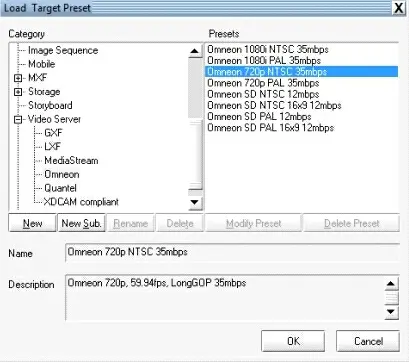
5. In the "TARGET" tab, select the profile(s) with which the resulting file will be transcoded:
TARGET tab
Please note that the selected profile must be a VBI/VANC supported codec. Additionally, depending on the selected profile it may be required to enable a captioning-related option, for instance:
CEA-608 (VBI)
Profile : Video server\GXF 1080i 29.97
Option to be enabled : Advanced > Data > Create data track
Teletext (VBI)
Profile : System\MPEG-2 Exporter v2
(MPEG-2 Transport Stream)
Option to be enabled : Transport Stream > Transport Stream > Include teletext in Transport Stream
Profile : System\Omneon Exporter v2
(MXF or MOV MPEG-2 Long-Gop)
Option to be enabled : Advanced > Metadata > Create reference file
CEA-708 (VANC)
Profile : System\Omneon Exporter v2
Option to be enabled : Advanced > Metadata > SMPTE436M DataTrack
Profile : Video server\Omneon 1080i NTSC
Option to be enabled : Advanced > Metadata > SMPTE436M DataTrack
NB: The project can be manually executed by pressing the [Conversion] button under the "CONVERT" tab.
SAVE button
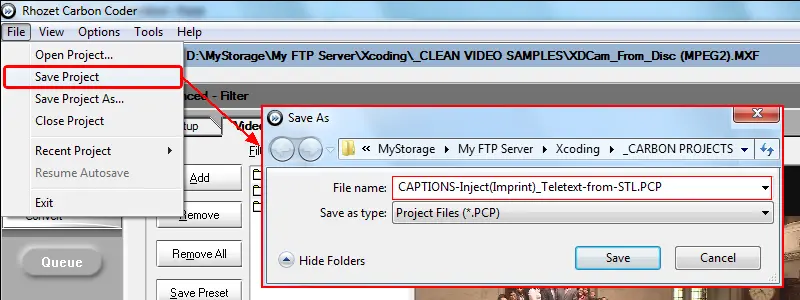
6. In order to use the ProMedia Carbon project via T-workflow, press the [Save Project] button to export the project template as a .PCP file:
Save Project
Note
Please refer to the "Available Filters for Subtitling" chapter for a complete list of ProMedia's video filters for subtitling.
 TARGET_tab
 ProRes,_DNx
 Closed_caption_configuration
 Save_Project