208.2.1 Settings
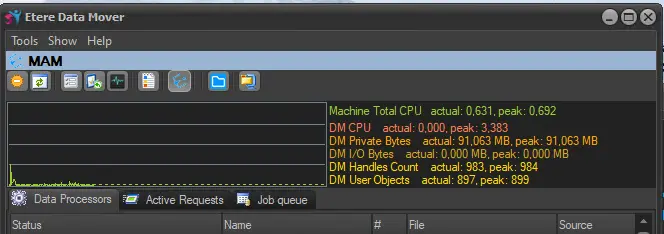
When you launch Etere Data Mover, the Tools menu contains a list of options for managing the performance.
Data Mover
Setting - Switch online / offline
Description : Set ALL the Data Mover Process to online (set the actions available) or offline (not available for future requests).
Setting - Read job queue
Description : Updates immediately the list of pending jobs waiting to be performed.
Setting - Options
Description : For detailed information on this section please refer to the Options chapter.
Setting - Refresh system configuration
Description : Update all the recent configurations set on the Etere Configuration module.
Setting - Show/Hide performance counters
Description : Show or hide the monitoring panel that displays the performance-related counters of the server (i.e. CPU usage, I/O bandwidth, etc).
Setting - Show messages
Description : Show all the SNMP messages sent by the application.
Setting - Open the logs files folder
Description : Browse the folder were all the Etere's Logs are located.
Setting - Save logs
Description : The save log option save the record of all performed actions, you can choose to save all the actions performed or those performed on previous week. The log would be saved in the Etere's installation folder, as well as in the Etere's Ftp Server (if selected).
Setting - Station name
Description : Show or hide the station bar that displays the name of the station.
 data_mover