59.2.40.10 Using Parental Guidance
Copying restrictions data
Restrictions data can be copied from one parental guidance to another by right-click and selecting 'copy data'; it copies the selected restriction data to another parental guidance from the same station or other stations:
copy_data
Assigning parental guidance to assets
By default, new assets are created without restriction to be scheduled related to their contents. However, their parental guidance level can be set under the Media Library module on the 'Properties' tab:
Properties_tab
Therefore, each time an asset with a set parental guidance level is scheduled, the operator will be informed about occasional restrictions:
• Asset with parental guidance enabled correctly scheduled,
• Asset with parental guidance enabled scheduled on a restricted time slot.
Scheduling restrictions
Restrictions set on these sections are valid for broadcast programming carried out on both Etere Scheduling (Executive Editor) and Etere Air Sales (Strategic Editor). When a program is scheduled within the playlist, besides its classification restrictions, the classification restrictions of the program within which it is intended to be scheduled are also checked.
Notes:
• The parental guidance control can be specifically enabled under the parameters of the Executive Editor and Strategic editor.
• In case a local and the main time are set for the system, the checking will be performed based on the local time.
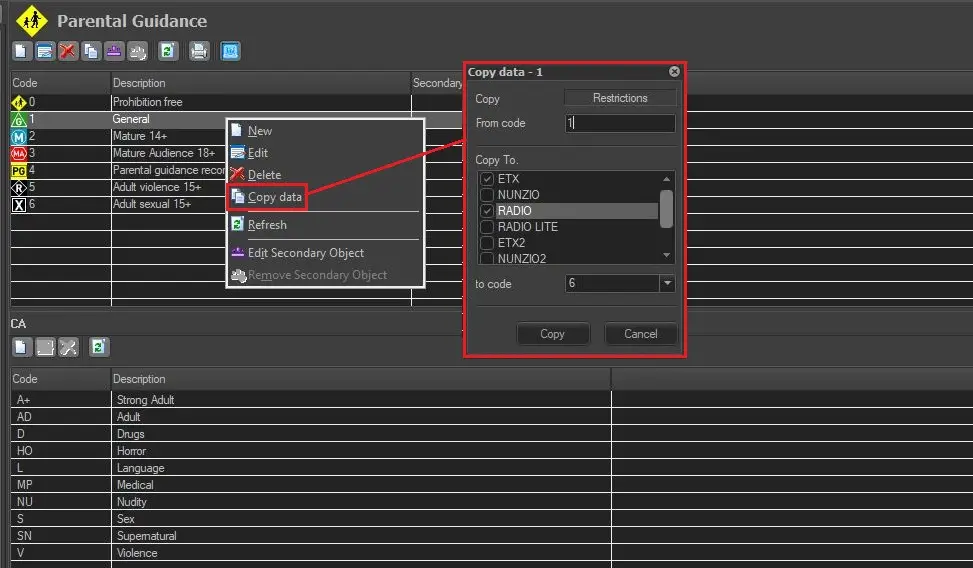 copy_data
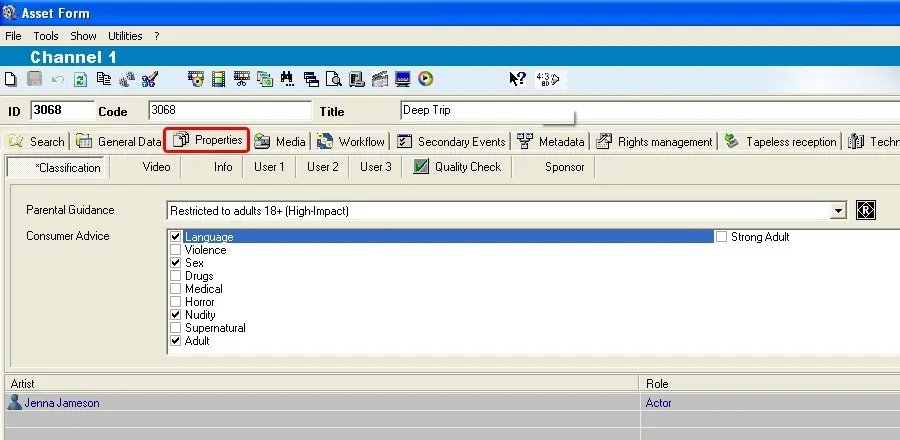 'Properties_tab